Blog

  • No-Shows in Your Nail Studio: How to Cut Missed Appointments by 60% — Without Deposits

    You prepped the station. Laid out the gel colors she picked over DM. Blocked 90 minutes in your calendar and turned down another client who wanted that exact slot. Then 2 PM comes. 2:05. 2:10. Nothing. No message. No call. No show.

    If you run a nail studio, you know this scene by heart. It’s not a once-in-a-while thing — it’s a weekly reality. And every empty chair doesn’t just cost you that one appointment. It costs you the client you could have taken instead, the momentum of your day, and a quiet kind of frustration that builds up over time.

    Most nail techs deal with no-shows in one of two ways: they start requiring deposits (which scares off new clients) or they just accept it as “part of the business.” Neither is great. There’s a third option that most studios overlook — and it reduces no-shows by up to 60% without adding any friction to the booking process.

    Table of Contents


    What No-Shows Actually Cost Your Studio

    Let’s do the math that most nail techs avoid — because the number is bigger than expected.

    The Basic Calculation

    A typical nail studio in a German city charges around €55 for a full gel set and €35 for a fill. The average appointment value, blending new sets, fills, and add-ons, sits around €50–€60. Let’s use €55 as a baseline.

    If you have 5 no-shows per week — which is conservative for a studio with 2 chairs and a steady Instagram following — the math looks like this:

    5 no-shows × €55 = €275 per week
    €275 × 4 weeks = €1,100 per month
    €1,100 × 12 months = €13,200 per year

    €13,200. That’s a vacation. That’s new equipment. That’s a part-time employee for three months. Gone — because people didn’t show up.

    The Costs You Don’t See

    The lost appointment revenue is just the headline number. There are layers underneath:

    The turned-away client. When someone else asked for that 2 PM slot and you said “sorry, I’m booked,” you made a choice based on a commitment that didn’t hold. That turned-away client might have been a new regular. Now she found another studio. Double loss.

    The dead time. A 90-minute no-show leaves a gap that’s almost impossible to fill on short notice. You can’t just ring up a walk-in for a full gel set — that’s not how nail appointments work. So you sit. Or you scroll. Or you clean something that’s already clean.

    The emotional drain. After the third no-show in a week, you start questioning your business. “Am I charging too much? Am I not good enough? Why don’t people respect my time?” None of those thoughts are productive — and none of them reflect reality. Your work is great. People just forget.


    Why Nail Clients No-Show (It’s Not What You Think)

    It’s easy to take no-shows personally. But the truth is, 90% of nail studio no-shows happen for reasons that have nothing to do with you or your service.

    They Forgot

    This is the number one reason. A client books on Tuesday via Instagram DM for the following Saturday. By Thursday, she’s dealt with a work deadline, a family thing, and two other appointments. Saturday morning comes, and she vaguely remembers she had “something” — but was it this Saturday or next? She can’t find the DM because it’s buried under 40 newer messages. So she does nothing.

    No malice. No disrespect. Just a human brain doing what human brains do — forgetting things that aren’t right in front of them.

    They Felt Awkward About Canceling

    Some clients know they can’t make it, but feel bad about canceling. So instead of sending a message saying “hey, something came up,” they just… don’t show. It feels easier in the moment. The irony is that a cancellation — even a late one — gives you a chance to fill the slot. A silent no-show gives you nothing.

    The Booking Wasn’t Firm Enough

    This happens a lot with DM bookings. The conversation goes: “Hey, do you have Saturday open?” → “Yes, 2 PM works!” → “Cool, I’ll be there!” That feels like a booking — but there was no formal confirmation, no calendar invite, no reference the client can scroll back to. In her mind, it was more of a “maybe” than a “definitely.”

    She Found Another Studio

    Sometimes a client messages three studios at once. The one that responds fastest and makes booking easiest gets the appointment. She might have “booked” with you, but she also booked with Studio B — and Studio B sent a confirmation and a reminder, so that’s where she went. This connects directly to the speed-to-lead principle: the studio that replies first and confirms strongest wins.


    Deposits vs. Reminders: Which Actually Works Better?

    The instinctive reaction to no-shows is to start charging deposits. “If they put €20 down, they’ll show up.” And there’s truth to that — financial commitment does increase follow-through. But deposits come with a cost that doesn’t show up in your no-show stats: the bookings that never happen in the first place.

    The Deposit Problem

    Requiring a deposit before a first appointment adds friction at the worst possible moment — when a potential new client is on the fence. She found you on Instagram, likes your work, and is ready to try you out. Then she hits a payment wall. She has to enter card details, trust a studio she’s never visited, and commit money before she’s even seen the place. A percentage of those potential new clients will drop off right there. You’ll never know they existed.

    For regulars, deposits feel like distrust. A client who’s been coming to you for 6 months doesn’t want to prepay — it sends a signal that you don’t trust her to show up. That’s not great for the relationship.

    The Reminder Alternative

    Automated reminders achieve the same goal — reducing no-shows — without any of that friction. A friendly WhatsApp message 24 hours before the appointment costs you nothing, doesn’t scare anyone off, and actually strengthens the relationship. The client thinks: “Oh nice, she remembered me. She’s on top of things.”

    The data backs this up. For a deeper look at why WhatsApp reminders outperform every other channel, check out our complete guide to reducing no-shows with WhatsApp.

    When Deposits Do Make Sense

    Deposits aren’t bad — they’re just a second line of defense, not your first. For high-value services (a 3-hour nail art session at €150), for peak demand (Saturday slots that always fill up), or for repeat no-show offenders, a deposit is reasonable and expected. But for the average €55 gel set with a new client? A reminder is more effective and far less costly in terms of lost bookings.


    Why WhatsApp Reminders Work So Well for Nail Studios

    Your clients live on WhatsApp. It’s where they text friends, share nail inspiration, and — increasingly — where they book services. Sending a reminder on WhatsApp isn’t like sending an email that goes to spam or an SMS that feels like a bank notification. It lands in the same app she uses 50 times a day.

    The Numbers

    WhatsApp messages have an open rate of around 98%. Email? About 20–30%. SMS? Around 90%, but with no easy way to reply. WhatsApp is not only read — it invites a response. A client can reply “yes, see you tomorrow!” or “can I move to 3 PM?” in seconds. That interaction is gold.

    What a Great Nail Studio Reminder Sounds Like

    Not: “REMINDER: You have an appointment tomorrow at 14:00.”

    But: “Hey Sarah! Just a heads-up — your gel set appointment is tomorrow (Saturday) at 2 PM. I’ve got your color ready! If anything changed, just let me know and we’ll find a new time 😊”

    The first feels like a system alert. The second feels like a message from someone who cares. Same information, completely different impact. The personalized version gets more confirmations, more reschedules (instead of silent no-shows), and builds a stronger client relationship.


    How CalendarApp Automates the Whole Thing

    You could send these reminders manually — and some nail techs do, usually during downtime between appointments. But with 15–20 clients per week, that’s 15–20 individual messages you need to remember to send, at the right time, on the right platform. Every single week. It’s one more thing on a to-do list that’s already full.

    CalendarApp automates it entirely.

    Automatic Reminders on the Channel They Booked On

    When a client books — whether through WhatsApp, Instagram DM, or Facebook Messenger — CalendarApp automatically schedules a reminder. It sends 24 hours before the appointment (and optionally 2 hours before) on the same channel the client originally used. No channel-switching confusion, no “did she even see it?” uncertainty.

    Because the AI is trained on your studio’s tone and details, the reminder sounds like you — not like a system. Your vibe, your language, your emojis (or not). Clients don’t notice it’s automated.

    One-Tap Reschedule Instead of Silent No-Show

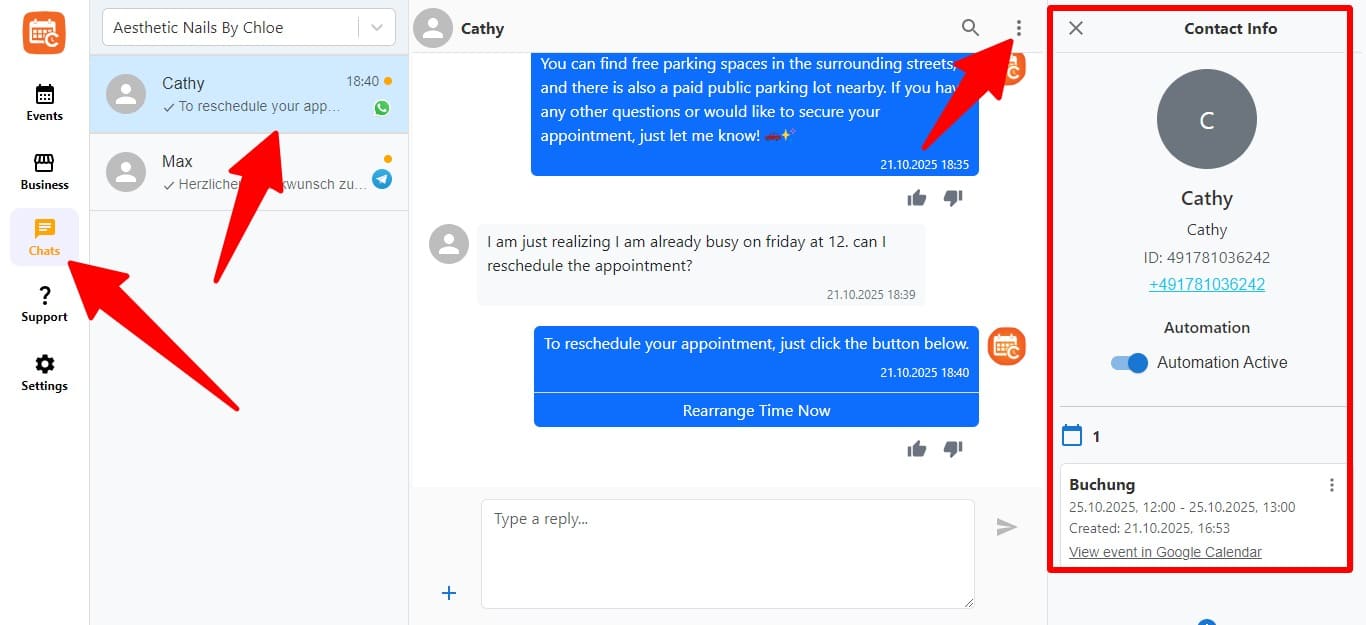
    The reminder makes it effortless for a client to confirm or reschedule. If she can’t make it, she just says so — and CalendarApp offers alternative slots from your Google Calendar in real time. She picks a new time, you get a new booking, and the original slot opens up for someone else. Instead of a no-show costing you €55, you get a rescheduled appointment and a chance to fill the freed slot.

    Booking Confirmations That Stick

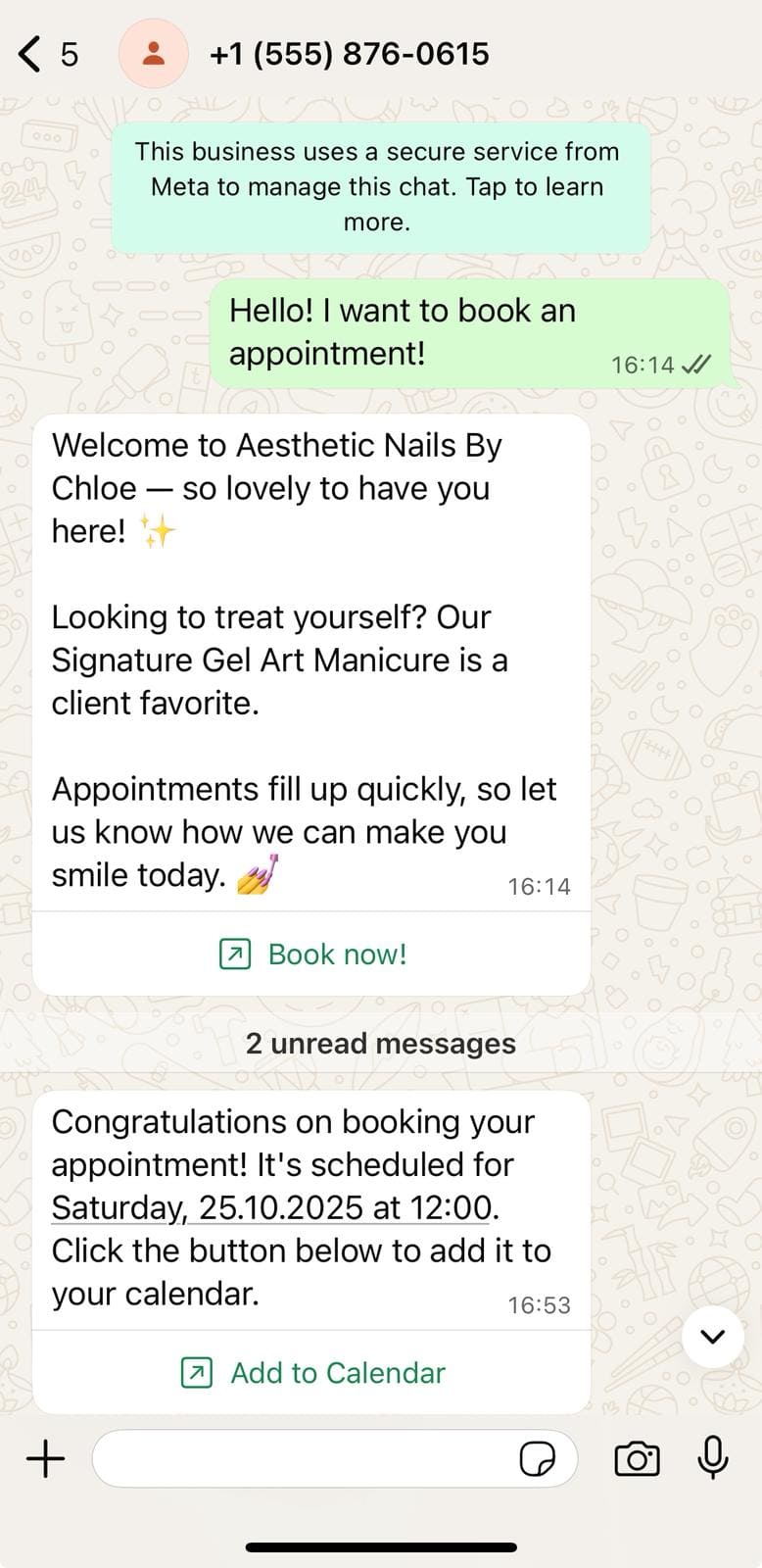
    Beyond reminders, CalendarApp sends a proper confirmation the moment someone books — with the service, date, time, and your studio address. That confirmation lives in the client’s WhatsApp or Instagram chat, easy to scroll back to. No more “wait, was it this Saturday or next?” ambiguity. This alone reduces the “I forgot” no-shows significantly.


    Lisa’s Story: From 6 No-Shows a Week to 2

    Lisa runs a nail studio in Düsseldorf with one employee. Her Instagram is strong — beautiful nail art photos, reels, client shout-outs — and it drives a consistent flow of DM inquiries. The problem? Somewhere between “I love your work!” and “see you Saturday,” things fell apart.

    On average, Lisa had 6 no-shows per week. At €55 per appointment, that’s €1,320 per month in lost revenue. She tried everything: posting a “no-show policy” in her Stories, asking for deposits through PayPal (which most new clients ignored), and manually texting reminders (which she kept forgetting to do between appointments).

    Before CalendarApp:

    • 6 no-shows per week (average)
    • Revenue loss: ~€1,320/month
    • New client deposit requests: ~40% drop-off at that step
    • Manual reminders: sent sporadically, forgotten on busy days
    • Rescheduling process: back-and-forth DMs taking 10–15 minutes per client

    After CalendarApp:

    • No-shows dropped to 2 per week — a 67% reduction
    • Revenue recovered: ~€880/month
    • Deposit requirement removed for standard services → new client bookings increased by ~25%
    • Reminders sent automatically, 24h and 2h before every appointment
    • Rescheduling handled in-chat: client picks a new slot in under a minute
    • Lisa’s time saved: ~30 minutes/day she used to spend on reminder texts and rescheduling DMs

    The biggest shift? Lisa stopped thinking about no-shows entirely. They went from a daily frustration to a background noise she barely noticed. And the clients who did receive reminders told her they appreciated the heads-up — it made the studio feel more professional, not less personal.

    Lisa’s results mirror what other nail studios have experienced. See how one studio tripled its bookings through WhatsApp and Instagram with a similar approach.


    5 Things You Can Do This Week

    1. Send a manual WhatsApp reminder for tomorrow’s clients — right now. Open your booking list, send each client a quick “Hey, just confirming your [service] tomorrow at [time]!” Even done manually, this will reduce tomorrow’s no-shows. See how it feels, then decide if you want to automate it.

    2. Switch from deposit-first to reminder-first for new clients. Try dropping the deposit for standard bookings (keep it for high-value services) and replacing it with a confirmation + 24-hour reminder. Track your no-show rate for two weeks. Most studios see an improvement — and more new bookings.

    3. Make rescheduling dead easy. When a client messages “I can’t make it,” respond with alternative slots immediately. Don’t make her feel bad. Don’t ask why. Just offer new options. The easier it is to reschedule, the fewer silent no-shows you’ll get.

    4. Send a booking confirmation that’s impossible to miss. After someone books via DM, send a standalone confirmation message with the service, date, time, and address — as its own message, not buried in a conversation thread. She should be able to scroll back to it in 2 seconds.

    5. Automate the whole process. If you’re tired of doing this manually — and you will be after a week — CalendarApp handles confirmations, reminders, and rescheduling across WhatsApp, Instagram, and Messenger, in your tone, with zero effort from you. Set it up in minutes and stop thinking about no-shows.


    Frequently Asked Questions

    How many no-shows is “normal” for a nail studio?

    Most nail studios with active social media bookings experience 3–8 no-shows per week. The rate tends to be higher for studios that book primarily through DMs without a confirmation or reminder system in place. With automated reminders, that number typically drops to 1–3.

    Should I charge deposits or use reminders?

    Reminders first, deposits second. Automated WhatsApp reminders reduce no-shows by up to 60% without adding any booking friction. Save deposits for high-value services (€100+), peak-demand slots, or clients who have a history of missing appointments.

    Won’t my clients find automated reminders annoying?

    The opposite. Clients consistently report that friendly appointment reminders make a studio feel more professional and organized. The key is tone — a warm, personal message (“Hey Sarah, your gel set is tomorrow at 2!”) feels caring, not clinical. Most clients reply with a confirmation or a thank-you.

    What if a client reschedules after getting a reminder?

    That’s a win. A reschedule is infinitely better than a silent no-show, because it frees the original slot for someone else. With CalendarApp, the rescheduling happens in-chat — the client picks a new time from your live calendar, and the old slot opens up automatically.

    Does this work for bookings made on Instagram, not just WhatsApp?

    Yes. CalendarApp sends reminders on the same platform the client originally used. If she booked via Instagram DM, the reminder arrives in her Instagram DMs. If she booked on WhatsApp, the reminder goes to WhatsApp. The conversation stays natural and in context.

    How quickly can I set this up?

    Most nail studio owners are fully set up in under 30 minutes. You connect your messaging channels, sync your Google Calendar, and add your services and pricing. No technical skills needed — there’s a step-by-step guide that walks you through everything.

    Can I still do walk-ins and manual bookings alongside automated ones?

    Absolutely. CalendarApp syncs with your Google Calendar in real time, so any appointment you add manually (or any time you block off) is immediately reflected. Walk-ins, phone bookings, and automated bookings all coexist without conflicts.


    Your Chair Should Never Be Empty Because Someone Forgot

    Every no-show is a slot you blocked, a client you turned away, and revenue that disappeared. Not because your work isn’t good enough — because nobody reminded her. The fix isn’t complicated, and it doesn’t involve charging deposits that scare off new clients.

    One friendly WhatsApp reminder, sent automatically, 24 hours before the appointment. That’s it. It keeps your calendar full, your revenue protected, and your clients feeling cared for.

    For the full picture on reducing no-shows — including strategies beyond nail studios — check out our complete no-show guide. And if you’re also losing potential clients because DM inquiries go unanswered for hours, see how replying first wins the booking.

    → Try CalendarApp free and stop losing revenue to empty chairs

  • You Answer the Same 10 Questions 100 Times a Month. There’s a Better Way.

    “How much is a gel set?” “Where are you located?” “Do you have parking?” “Are you open on Sundays?” “Can I bring my own nail polish?”

    You could answer these in your sleep. In fact, you practically do — you’ve typed these replies so many times that your phone autocompletes them. And yet, every single day, the same questions keep rolling in. On WhatsApp. On Instagram. On Facebook. Sometimes by phone.

    Each one takes 2–3 minutes to answer. That doesn’t sound like much — until you add it up. Ten FAQ-style questions per day × 3 minutes × 25 working days = 12.5 hours per month. That’s nearly two full workdays spent telling people things you’ve already told a hundred others. Two days a month you could have spent on actual clients, on marketing, on growing your business — or just on breathing.

    The worst part? It’s not even selling. It’s logistics. And it’s completely automatable — without losing the personal, friendly tone your customers love.

    Table of Contents


    The FAQ Trap: Why You’re Stuck in a Loop

    Every service business — no matter the industry — has a set of questions that come up over and over. Not because your customers are lazy (they’re not), but because this information matters to them before they commit to a booking. They want to know the price, the location, what to expect, and what to bring. Perfectly reasonable questions.

    The problem isn’t the questions. The problem is that you are the answer engine.

    The Top 10 That Never Stop

    Regardless of whether you run a nail studio, a dental practice, a boat charter, or a car dealership, your FAQ list probably looks something like this:

    1. How much does [service] cost?
    2. Do you have availability on [day]?
    3. Where are you located? / Is there parking?
    4. What are your opening hours?
    5. How long does [service] take?
    6. Do I need to bring / prepare anything?
    7. Can I cancel or reschedule?
    8. Do you accept [payment method]?
    9. Is [specific option] available? (vegan menu, specific treatment, specific car model)
    10. How do I book?

    You could probably add three more that are specific to your vertical. For a boat charter, it’s “Do I need a license?” For a dental practice, it’s “Do you accept my insurance?” For a yoga studio, it’s “Do I need my own mat?” For a car dealership, it’s “Is this car still available?”

    These questions aren’t going away. As long as you’re in business, people will ask them. The only variable is whether you answer them manually — again and again and again — or let a system do it for you.


    The Time Math: How Much Are FAQs Really Costing You?

    Let’s get specific, because the numbers are worse than most people expect.

    Across Verticals

    Nail studio: 8 FAQ messages per day × 3 minutes each = 24 minutes/day. Over 25 working days, that’s 10 hours/month. At an average hourly revenue of €55 (what you’d earn if you were doing nails instead), that’s €550/month in opportunity cost.

    Dental practice: Front desk staff spend an estimated 45 minutes per day answering repetitive phone and message inquiries. Over a month, that’s 18.75 hours — nearly half a work week — on questions that could be answered automatically.

    Boat charter: During peak season, a popular charter might field 15–20 FAQ messages per day. At 5 minutes each (these tend to be longer — pricing tiers, license requirements, what’s included), that’s up to 1.5 hours per day. Over a 5-month season, that’s 150+ hours spent answering the same questions about the same boats.

    Restaurant: “Do you have vegan options?” “Is there a kids’ menu?” “Can we reserve the terrace?” “What time does the kitchen close?” A busy restaurant might get 10+ of these per day across Google, Instagram, and phone. At 2 minutes each, that’s 8+ hours per month — all on information that’s technically on the website but nobody checks.

    Yoga studio: “What level is this class?” “Can beginners join?” “Do I need a mat?” “Is there a changing room?” Studios with 5+ classes per day easily handle 6–8 FAQ messages daily. Monthly total: 7–10 hours.

    The Time You Don’t See

    The per-question cost isn’t just the reply itself. It’s the context switch. You’re in the middle of something — a client, a task, a meal — and your phone buzzes. You check it. It’s a FAQ. You switch mental gears, type the reply, go back to what you were doing. That interruption costs you 5–10 minutes of focus, not just the 2 minutes of typing. Over a day with 8 interruptions, you’ve lost nearly an hour of productive flow — and that doesn’t show up in any calculation.


    Why Generic Chatbots Fail at This (And Why You Gave Up on Them)

    If you’ve tried automating your FAQs before — maybe with a basic chatbot or an auto-reply on Instagram — there’s a good chance it went badly. Most small business owners who’ve experimented with automation have a chatbot horror story: robotic replies, frustrated customers, messages that made the business look unprofessional.

    The Script Problem

    Traditional chatbots work from decision trees. If the customer says X, respond with Y. If they say A, respond with B. But customers don’t follow scripts. They ask questions in unexpected ways. They combine two questions in one message. They use slang, typos, and voice notes. The moment someone phrases a question differently than the script anticipated, the bot breaks — and the customer gets a “Sorry, I didn’t understand that” message that makes your business look amateur.

    The Personality Problem

    Even when scripted bots get the answer right, they get the tone wrong. Customers can smell a bot from a mile away when the replies feel canned. “Thank you for your inquiry. Our business hours are Monday through Friday, 9 AM to 6 PM.” Technically correct. Totally lifeless. It doesn’t match the friendly, casual energy you put into your Instagram posts or the warm way you greet walk-in clients.

    The Booking Gap

    The biggest failure of generic FAQ bots is what happens after the answer. A customer asks “How much is a teeth cleaning?” and the bot replies “€90.” Great. Now what? The customer has to figure out how to actually book. Navigate to your website. Find a booking page. Pick a date. That’s 4 extra steps of friction — and every step loses people. A good FAQ system doesn’t just answer the question. It transitions the customer seamlessly from “I’m curious” to “I’m booked.”


    What Great FAQ Automation Actually Looks Like

    Forget everything you know about chatbots. Here’s what good FAQ automation actually feels like from the customer’s perspective:

    A customer messages you on WhatsApp at 8:30 PM: “Hey, what’s the deal with your classes? Do I need experience? And how much is a drop-in?”

    Within 30 seconds, they get: “Hey! Great questions 😊 Our classes range from beginner to advanced — beginners are totally welcome, no experience needed. A drop-in is €18. We’ve got a Vinyasa Flow tomorrow at 10 AM and a Gentle Yoga on Thursday at 6 PM if you’d like to give it a try. Want me to save you a spot?”

    Two things happened here. First, the customer got a complete, natural-sounding answer to a multi-part question — instantly, at 8:30 PM, when no human was available. Second, the response didn’t just answer the FAQ — it offered specific availability and a direct path to booking. The customer says “Thursday at 6 sounds great!” and they’re booked. Done. No website needed. No form. No waiting until morning.

    That’s the difference between a dumb bot and intelligent automation. The customer feels helped. You feel nothing — because you were watching a movie while this happened.


    How CalendarApp Handles Your FAQs

    CalendarApp treats FAQ automation not as a standalone feature, but as the natural starting point of every customer conversation. Because most conversations start with a FAQ — and the goal is to turn that FAQ into a booking.

    AI That Understands the Question — However It’s Asked

    CalendarApp’s AI doesn’t rely on keyword matching or decision trees. It understands context. Whether a customer writes “How much for nails?”, “What are your prices?”, or “yo what does a gel set run” — it recognizes the intent and responds accurately. Multi-part questions, follow-ups, typos, casual language — all handled. Because the AI is trained on your business details and tone, the answers sound like they’re coming from you, not from a template.

    From FAQ to Booking in the Same Conversation

    This is the part that separates CalendarApp from every FAQ tool you’ve tried before. When a customer asks a FAQ and the AI answers, it doesn’t stop there. It naturally transitions to offering availability — checking your Google Calendar in real time and suggesting open slots. The entire flow — question, answer, booking — happens in one conversation thread, on the platform the customer chose.

    No redirects. No “visit our website to book.” No friction. The customer asks, gets answered, and books — all without leaving WhatsApp, Instagram, or whatever channel they messaged you on. And because it’s all connected, double bookings are impossible.

    Every FAQ Answered Is a Customer Kept

    Here’s what most people don’t realize: unanswered FAQs don’t just waste your time — they lose you customers. A person who asks “Do you have vegan options?” and doesn’t get a reply within an hour will simply go to the restaurant that did reply. A potential yoga student who asks about class levels and hears nothing will find another studio. The business that replies first doesn’t just win on booking requests — it wins on FAQs too. Every unanswered question is a potential customer walking away.

    Bonus: FAQ Data Shows You What Customers Care About

    When CalendarApp handles your FAQs, it creates a pattern you can learn from. Which questions come up most often? Which services get the most price inquiries? Which information is clearly missing from your Instagram bio or website? This data helps you improve your marketing, update your profiles, and anticipate customer needs before they even ask. It’s not just automation — it’s intelligence.


    Real-World Example: How a Yoga Studio Reclaimed 10 Hours a Month

    Priya runs a yoga studio in Cologne with 6 classes per day and a mix of regulars and drop-ins. Her Instagram is her main marketing channel, and it works — she gets a steady stream of DMs from people discovering her studio. The problem? About 70% of those messages were the same 5 questions: pricing, class schedule, beginner-friendliness, what to bring, and location/parking.

    Priya was answering these personally, usually between classes. She’d finish a session, check her phone, see 4 DMs — three of which were FAQ — type out replies, and rush to set up for the next class. By the end of the day, she’d spent 30–40 minutes on messages that didn’t require any expertise or personal touch. Just logistics.

    Before CalendarApp:

    • ~12 FAQ messages per day across WhatsApp and Instagram
    • 30–40 minutes/day on repetitive replies
    • Evening and weekend FAQs answered next morning — by which time some leads had booked elsewhere
    • Inquiry-to-booking conversion from DMs: ~20%

    After CalendarApp:

    • All FAQ messages answered instantly — 24/7
    • FAQ replies seamlessly transition into class booking with live availability
    • Priya’s time on messages: ~10 minutes/day (complex questions and VIP interactions only)
    • Inquiry-to-booking conversion from DMs: ~38%
    • Time reclaimed: ~10 hours/month
    • That time went into creating a new workshop series — which generated additional revenue

    Priya didn’t lose the personal touch. She gained more of it — because instead of typing “A drop-in is €18” for the 400th time, she was free to connect with students in person, plan new offerings, and focus on what she actually loves about running a studio.


    Quick Wins You Can Start Today

    Even without any automation tool, you can reduce the FAQ burden this week:

    1. Write down your top 10 questions. Seriously — make a list. You probably know them by heart, but seeing them written down makes the pattern undeniable. These are the questions that automation should handle.

    2. Pin an FAQ highlight on Instagram. Create a Story highlight called “FAQ” or “Info” with answers to your top 5 questions. It won’t eliminate DMs entirely, but it’ll reduce them. Include pricing, hours, location, and whatever vertical-specific question you get most often.

    3. Set up quick replies on WhatsApp Business. Save your top 10 FAQ answers as templates. When a question comes in, you can send the answer with a few taps instead of typing from scratch. It cuts reply time from 3 minutes to 30 seconds.

    4. Update your Google Business profile. Many FAQ questions come from people who didn’t check your profile first. Make sure your hours, location, services, and contact info are current and complete. The fewer questions people need to ask, the fewer you need to answer.

    5. Automate the whole thing. If you’re ready to stop answering the same questions entirely, CalendarApp handles FAQs across every messaging platform — instantly, in your tone, with a seamless bridge to booking. Setting up automated replies takes minutes. The time savings start immediately.


    “But My Customers Want to Talk to a Real Person”

    Do they, though? Think about what your customers are actually asking when they send a FAQ. They’re not looking for a heart-to-heart. They want to know your price, your hours, or your location. They want an answer — fast. Whether that answer comes from you or from an AI that sounds like you, they don’t care. What they do care about is speed and accuracy.

    A customer who asks “What time do you close on Saturdays?” and gets an instant, friendly answer is happy. A customer who asks the same question and waits 3 hours is annoyed — regardless of how personal your eventual reply is.

    “But some conversations need a human touch.” Absolutely. And those conversations are the 20–30% that go beyond FAQ — the custom request, the sensitive situation, the VIP client who wants to chat. CalendarApp handles the routine 70–80% so you’re free to give those meaningful conversations the attention they deserve. You’re not replacing yourself. You’re freeing yourself.

    “My FAQ page on my website already covers this.” It might — but your customers aren’t reading it. They’re messaging you because it’s easier to ask than to search. That behavior isn’t going to change. Instead of fighting it, meet them where they are: in the DMs, on WhatsApp, on Messenger. Just let AI do the answering.

    “I don’t want to sound like a robot.” Neither does CalendarApp. That’s the whole point. The AI uses your service names, your pricing, your words, your vibe. Customers don’t notice. What they notice is that you replied in 20 seconds on a Sunday evening — and that makes you look more professional, not less.

    “Answering questions is part of the job.” Answering new questions is part of the job. Answering the same question for the 100th time is busywork. There’s a difference. Automating the repetitive stuff doesn’t make you less dedicated — it makes you smarter about where you put your energy.


    Frequently Asked Questions

    How many hours can I realistically save by automating FAQs?

    Most small service businesses report saving 8–12 hours per month once FAQ automation is running. If you’re in a high-volume vertical like a restaurant, salon, or seasonal rental, the number can be significantly higher — especially during peak periods.

    Will the AI answer questions I didn’t anticipate?

    Yes. Unlike scripted bots, CalendarApp’s AI understands context and can handle questions it hasn’t seen before — as long as the answer exists in the business information you’ve provided. If it genuinely doesn’t know, it responds honestly and can route the conversation to you.

    Can the AI handle questions in multiple languages?

    CalendarApp can respond in the language the customer uses. If a customer messages in German, the reply comes in German. If they write in English, the reply is in English. This is especially useful for businesses with international customers, like boat charters, hotels, and restaurants in tourist areas.

    What happens if someone asks something complex that goes beyond FAQ?

    CalendarApp recognizes when a conversation needs human input and can notify you or hand the conversation over. The AI handles the straightforward questions; you step in for the nuanced ones. You stay in control without being the bottleneck.

    Does FAQ automation also help with bookings, or just answering questions?

    Both. CalendarApp’s FAQ responses naturally transition into booking when appropriate. If someone asks “How much is a private yoga session?”, the AI answers the price and immediately offers available time slots. The FAQ becomes the starting point of a booking conversation — not a dead end.

    How do I set it up? Do I need to write all the answers myself?

    You provide your business information — services, prices, hours, location, policies, and any vertical-specific details. CalendarApp’s AI generates the answers in your tone. You don’t need to write scripts or build decision trees. Setup typically takes under 30 minutes.

    Can I update the information later if my prices or hours change?

    Yes. You can update your business details at any time, and the AI immediately reflects those changes in its replies. No need to rebuild anything — just update the source information.


    Get Your Time Back. Let AI Answer the Repeat Questions.

    You got into this business because you love what you do — not because you love typing “We close at 7 PM” for the 80th time this month. Every minute you spend on a question you’ve already answered a hundred times is a minute taken from the work that actually matters: serving clients, building your brand, or simply living your life outside the business.

    FAQ automation isn’t about replacing the human side of your business. It’s about protecting it. When the repetitive stuff runs on autopilot, you have more energy and presence for the interactions that count.

    Pair it with smart lead qualification to focus on serious customers, instant replies to catch every inquiry the moment it arrives, automated reminders to cut no-shows, and follow-up messages to rewarm cold leads — and you’ve got a system that handles customer communication end to end, without burning you out.

    → Try CalendarApp free and stop answering the same questions

  • Stop Wasting Time on Tire-Kickers: How AI Qualifies Your Leads Before You Lift a Finger

    Monday morning. You open your phone and see 14 new messages — Instagram DMs, WhatsApp chats, a Facebook inquiry. Your heart does that little jump: business is coming in. You start replying. One person wants to know your prices. Another asks if you’re available Saturday. A third wants to see photos of your work. Two hours later, you’ve answered everyone. Bookings from all that effort? One. Maybe two if you’re lucky.

    The rest? Price-checkers who vanished. “Just looking” browsers. Someone who wanted a quote to compare you against three other businesses. A person who asked detailed questions and then ghosted. Sound familiar?

    This is the hidden time tax that every service business pays — and most don’t even realize how much it costs them. You treat every inquiry as if it’s a future customer, invest time and energy into answering, and then watch the majority evaporate. The problem isn’t that you’re bad at selling. It’s that you’re spending equal effort on unequal leads.

    What if you could tell — within seconds of someone reaching out — whether they’re serious or just browsing? Not by being rude. Not by ignoring people. But by letting AI ask the right questions and surface the leads that are actually ready to book.

    Table of Contents


    The Time Tax You Don’t See

    Every business owner knows the feeling of a wasted conversation. But few sit down and actually calculate how much time they spend on inquiries that go nowhere. When you do, the numbers are eye-opening.

    How Much Time Are You Really Spending?

    Let’s say you get 25 inquiries per week across all channels. You spend an average of 8 minutes on each — reading the message, checking your calendar, looking up pricing, typing a thoughtful response, maybe sending a follow-up. That’s 200 minutes per week — over 3 hours — just on initial replies.

    If your conversion rate from inquiry to booking is 30% (which is solid for most service businesses), that means 17 of those conversations didn’t result in a booking. At 8 minutes each, you spent 2 hours and 16 minutes per week on people who were never going to book. Over a month, that’s nearly 10 hours. Over a year? 120 hours of your life — three full work weeks — spent on tire-kickers.

    And that’s just the time cost. There’s also the mental cost: the frustration of crafting detailed replies that get ignored, the emotional whiplash of high-interest messages that go cold, and the slow erosion of enthusiasm that comes from chasing leads that were never real.

    It Hits Differently Across Verticals

    Nail studios: “How much for a gel set?” is probably the most common DM you receive. Most of these people are comparing prices across 5 studios. The ones who only care about getting the cheapest deal aren’t your ideal clients — and they’re the most likely to no-show or cancel last minute.

    Car dealerships: Test drive requests flood in from people who love browsing cars on Instagram but have no intention (or financing) to buy. Every test drive you accommodate takes 30–60 minutes of a salesperson’s time. Qualifying which requests are genuine saves hours per week.

    Yacht charters: “How much for a weekend?” arrives 50 times a month. Maybe 5 of those people are seriously ready to book. The other 45 are dreaming, planning for “someday,” or just curious. Each detailed response with pricing, availability, and boat specs takes 15 minutes. That’s 11 hours a month on dreamers.

    Dental practices: “Do you accept new patients?” and “How much is a cleaning?” come in constantly. But the patients who actually schedule are the ones with a specific need and a specific timeframe. Filtering for that saves reception staff hours every week.

    Business coaches: Discovery call requests that never show up. Questionnaires that never get filled out. People who want free advice disguised as “just a quick question.” Your time is literally your product — every minute spent on a non-serious lead is revenue lost.


    What “Qualifying” Actually Means (And What It Doesn’t)

    Let’s clear something up right away: qualifying leads doesn’t mean being rude, dismissive, or gatekeeping your services. It’s not about turning people away. It’s about understanding — as early as possible — what someone actually needs, whether your services are a good fit, and how ready they are to move forward.

    Qualification Is Asking the Right Questions

    When someone messages you with “How much do you charge?”, the instinct is to answer the question directly. And that’s fine. But a qualified response goes one step further: it answers the question and moves the conversation toward a booking decision.

    Instead of just “A gel set is €55,” a qualifying response might be: “A full gel set is €55 and takes about 90 minutes. I have openings this Thursday at 3 PM and Saturday at 11 AM — would either of those work for you?”

    That one extra sentence does two things. First, it gives the price-checker a reason to commit or leave. Second, it makes it effortless for the serious customer to say yes. The tire-kicker disappears quietly. The real customer books. Nobody got rejected — the process just naturally filtered for intent.

    What Qualification Is Not

    Qualification is not a gatekeeping quiz. It’s not making people fill out a 15-field form before they can talk to you. It’s not asking for a credit card upfront or demanding a deposit before answering basic questions. Those tactics work for some businesses, but for most small service providers, they create friction that scares away real customers alongside the tire-kickers.

    The best qualification feels invisible to the customer. They feel like they’re having a helpful conversation. Behind the scenes, the conversation is naturally revealing who’s serious and who’s not.


    The Real Cost of Treating Every Inquiry Equally

    When you give every lead the same amount of attention, you spread yourself thin. And the irony is that the people who suffer most from this aren’t the tire-kickers — they got their answer and moved on. It’s your best customers who pay the price.

    Your Serious Leads Are Getting Short-Changed

    When you’re buried in 14 messages and trying to reply to everyone, the quality of each response drops. The person who was ready to book right now gets a rushed reply instead of a thoughtful one. The high-value client who asked a nuanced question gets a copy-paste response because you’re trying to get through the queue. Meanwhile, the person who just wanted a price to screenshot and compare got the same time and attention as someone ready to spend €500.

    Qualification isn’t just about filtering out bad leads — it’s about freeing you to give better attention to the good ones.

    The Revenue Impact

    Let’s put numbers on it. Say you’re a personal trainer who charges €80 per session. You get 30 DMs per week asking about your services. Without qualification, you spend 4 hours answering everyone, book 8 clients, and earn €640 from those sessions.

    With qualification — where AI handles the initial conversation, answers FAQs, and routes serious leads directly to booking — you spend 45 minutes on the 8 conversations that actually matter. Same revenue. But you just got 3 hours of your week back. That’s time you could use to train additional clients, create content, or simply rest. Over a month, that’s 12 hours reclaimed. Over a year? Six full work weeks — either more income or more life.


    What Smart Qualification Looks Like

    Before we talk about any specific tool, here’s what ideal lead qualification looks like for a service business:

    A new inquiry comes in on Instagram. The customer asks about pricing and availability. Within seconds, they get a helpful, personalized response that answers their question, provides relevant details about the service, and offers specific time slots. If the customer is interested, they can book right there — no back-and-forth needed.

    If the customer was just price-checking, they got their answer and moved on — without you spending a minute on it. If they had follow-up questions (“Do I need a license?” “What should I bring?” “Is parking available?”), those got answered automatically too. And if they’re genuinely interested but not ready to book right now, they stay in the system so you can follow up later.

    The result? Your time only gets invested when someone is ready to commit. Everything else runs on autopilot.


    How CalendarApp Qualifies Leads Automatically

    CalendarApp does lead qualification the way a great receptionist would — if that receptionist could work 24/7, across every messaging platform, without ever needing a break.

    Conversational Qualification — Not Forms, Not Quizzes

    When someone messages you on WhatsApp, Instagram, Facebook, or Telegram, CalendarApp responds immediately with a helpful, natural reply. It doesn’t ask the customer to fill out a form. It doesn’t redirect them to a website. It has a conversation — answering questions, providing service details, and gauging intent by the way the conversation flows.

    Because the AI is trained on your business, it knows what questions to answer, what details to offer, and how to naturally guide serious inquiries toward a booking. The price-checker gets a fast, accurate answer. The ready-to-book customer gets a fast, accurate answer plus available slots and a one-step booking path.

    From Inquiry to Booking Without You in the Middle

    Here’s where it gets powerful. For leads that are ready to commit, CalendarApp checks your Google Calendar in real time and offers available time slots directly in the chat. The customer picks a slot, confirms, and the booking appears on your calendar — without you ever opening the message. The entire qualification-to-booking flow happens in one conversation, on the platform the customer chose, in under two minutes.

    This is the same principle behind replying first — speed matters. But qualification adds a layer: you’re not just fast, you’re fast and smart about where you spend your energy.

    Better Customers, Fewer No-Shows

    There’s a downstream effect that most people don’t expect: qualified leads are better customers. When someone books through a qualification process — even a seamless, invisible one — they’ve demonstrated genuine intent. They asked questions, got answers, chose a time, and confirmed. That level of engagement means they’re far less likely to no-show. They’re less likely to cancel last minute. And they’re more likely to become repeat clients, because the booking experience felt professional and effortless.


    Real-World Example: How a Yacht Charter Stopped Chasing Dreamers

    Sophia runs a yacht charter on the Müritz in northern Germany. Her Instagram content is stunning — drone footage, sunset cruises, champagne on deck. Naturally, it attracts a lot of attention. The problem? Most of that attention comes from people who love the idea of a yacht trip but aren’t ready to book one.

    Before CalendarApp, Sophia would spend 1–2 hours per day answering DMs. The questions were predictable: “How much for a day trip?” “Do I need a boat license?” “Can I bring my dog?” “Is food included?” She’d answer each one carefully, send pricing, offer dates — and hear nothing back from about 80% of them.

    Before CalendarApp:

    • ~50 inquiries per week during peak season
    • 1–2 hours/day spent on replies
    • Inquiry-to-booking conversion: ~12%
    • Lots of “dreamers” who loved engaging but never committed
    • Sophia felt burned out from repetitive conversations

    After CalendarApp:

    • Every inquiry answered instantly — 24/7, across WhatsApp and Instagram
    • FAQ questions (license, pricing, dog policy, food) handled automatically
    • Serious leads guided directly to booking with live availability
    • Inquiry-to-booking conversion: ~28% (more than doubled)
    • Sophia’s time spent on messages: 15 minutes/day (handling VIP and complex requests only)
    • Hours reclaimed per week: ~8

    The conversion rate didn’t double because more people were interested — it doubled because the process stopped losing serious leads to slow replies and started guiding them straight to a booking. The dreamers still got their answers (and some eventually booked too). But Sophia’s time went where it mattered.


    Quick Wins You Can Start Today

    You don’t need AI to start qualifying your leads better. Here are five things you can try this week:

    1. Always include availability when you reply. Instead of just answering a price question, add: “I have openings on [day] at [time] — want me to book you in?” This instantly separates the browsers from the bookers. Serious people respond. The rest don’t — and that’s useful information.

    2. Create a FAQ template in WhatsApp Business. Identify your top 5 questions and write saved replies for each. This cuts your response time from 8 minutes to 2 — and frees you to spend more energy on the leads who go beyond FAQ.

    3. Ask one qualifying question early. After answering the initial inquiry, add something like: “Are you looking to book for this week or further out?” or “Is this for yourself or a group?” These small questions reveal intent without feeling like an interrogation.

    4. Stop chasing dead conversations after 48 hours. If someone doesn’t reply to your initial response within 2 days, let it go. You can always remessage them later with a proper follow-up — but spending energy on a third reply right now isn’t worth it.

    5. Let AI handle the first conversation entirely. If you’re ready to reclaim those 10+ hours per month, CalendarApp takes over the initial reply, FAQ answers, and booking flow — and only pulls you in when a conversation needs a human touch. Set it up in minutes.


    “But What If I Scare Away a Real Customer?”

    This is the fear that keeps business owners answering every message with maximum effort: what if the person who seems like a tire-kicker is actually about to spend €500? What if the “how much?” question is just the start of a serious booking?

    It’s a valid concern. And the answer is: smart qualification doesn’t ignore anyone. It answers everyone — fast, thoroughly, and helpfully. The difference is that it doesn’t require you to be the one answering.

    Every inquiry gets a response. Every question gets answered. Every serious lead gets a path to booking. The only thing that changes is who’s doing the work — you, or an AI that handles the routine 80% so you can focus on the meaningful 20%.

    “My business is too personal for AI to handle.” That might be true for the final sale — the custom consultation, the VIP experience, the complex project. But the initial inquiry? “What are your prices?” “Are you available Saturday?” “Where are you located?” These aren’t personal conversations. They’re logistics. And handling them instantly with AI makes the actual personal interaction better, because you’re not exhausted from repeating the same info 20 times a day.

    “I don’t get enough inquiries to need this.” If you get even 10 inquiries a week and convert 3, that means you’re spending time on 7 conversations that don’t convert. At 8 minutes each, that’s nearly an hour per week. And for a small business, every hour counts. Plus, if you’re spending less time on repetitive replies, you have more time to create content, do outreach, or improve your service — which brings in more inquiries.

    “I tried a chatbot once and it was terrible.” Fair. Most chatbots are terrible — because they work from rigid scripts that break the moment someone asks something unexpected. CalendarApp isn’t a decision-tree chatbot. It’s an AI that understands context, handles unexpected questions, and adapts to your business. The experience for the customer is a conversation, not a form.


    Frequently Asked Questions

    What does “lead qualification” mean for a small service business?

    It means figuring out — as early as possible — whether an inquiry is from someone who’s likely to book or someone who’s just browsing. Good qualification happens naturally through conversation: answering questions, offering specifics, and giving serious leads an easy path to commit.

    Does CalendarApp reject or ignore leads that aren’t qualified?

    No. CalendarApp answers every single inquiry — fully and helpfully. The difference is that it handles routine questions automatically and guides ready-to-book leads directly into your calendar. No one gets turned away; the process just runs without requiring your time.

    How does AI know who’s serious and who’s just browsing?

    It’s less about judging intent and more about facilitating it. When the AI answers a price question and immediately offers available time slots, serious leads take the next step — they book. Browsers get their answer and move on. The system doesn’t label anyone; it simply makes booking so easy that the people who want to commit, do.

    Won’t a real customer be put off by talking to AI instead of me?

    In practice, the opposite happens. Customers prefer getting an instant, helpful answer over waiting hours for a personal reply. Because CalendarApp uses your tone and knows your services, most customers don’t realize they’re talking to AI. And you can always jump into any conversation whenever you want.

    How much time can I realistically save?

    Most small service businesses that implement CalendarApp report saving 8–12 hours per month on initial inquiry responses alone. If you factor in the time saved on follow-ups, scheduling back-and-forth, and FAQ repetition, the total is often higher.

    Does this work for high-ticket services where every lead matters?

    Especially for those. If your average deal is €500+ (car sales, real estate viewings, charter bookings, coaching packages), you can’t afford to lose serious leads to slow replies or let them drown in a sea of casual inquiries. Qualification ensures your high-value leads get handled immediately and professionally — every single time.

    Can I customize what questions the AI asks?

    Yes. CalendarApp’s AI adapts to the information you provide about your business, services, and customer flow. You decide what details are important, what tone to use, and how the booking process should work. The AI handles the execution based on your rules.


    Stop Giving Your Best Energy to Your Worst Leads

    Every minute you spend crafting a reply for someone who was never going to book is a minute you’re not spending on the customer who’s ready to say yes. That’s not a failure of effort — it’s a failure of system. You don’t need to work harder. You need a smarter front door.

    Let AI handle the price questions, the FAQ, the “just checking” messages, and the tire-kickers. When a lead is serious, CalendarApp guides them to a booking. When they’re not, they get a helpful answer and move on — no time wasted on either side.

    Combined with instant replies that catch every inquiry the moment it arrives, automatic reminders that make sure they show up, and smart follow-ups that rewarm leads who went cold — you’ve got a system that handles the entire customer journey without burning you out.

    → Try CalendarApp free and let AI handle the tire-kickers

  • Your Best Leads Already Know You. Stop Ignoring Them.

    Scroll through your Instagram DMs from three months ago. Or your WhatsApp Business chats from last summer. How many conversations do you see that started well — a price question, an availability check, a “sounds great, I’ll get back to you” — and then just… stopped?

    Those aren’t dead leads. They’re sleeping ones. And waking them up is one of the cheapest, most effective things you can do for your business — yet almost nobody does it.

    Here’s the uncomfortable truth: you spend time and money getting people to find you. Instagram ads, Google listings, word of mouth, content creation. Someone discovers you, reaches out, asks a question. And then life gets in the way — theirs or yours — and the conversation dies. You move on to chasing the next new lead, while the person who already showed interest fades into your message history.

    That’s money you already spent, walking away. And getting it back is far easier — and far cheaper — than you think.

    Table of Contents


    The Goldmine Sitting in Your Inbox

    Every service business — from nail studios to car dealerships, dental practices to yoga studios — has a backlog of conversations that went nowhere. Not because the person wasn’t interested, but because the moment passed. No one followed up. No one checked back in. The conversation just sat there, buried under newer messages.

    How Big Is the Problem?

    Think about your own numbers for a second. If you get 20 inquiries a week and convert 8 of them into bookings, that’s a 40% conversion rate — which is actually solid. But it also means 12 people per week showed enough interest to reach out and then didn’t book. Over a month, that’s nearly 50 leads. Over a year? Over 600 people who were curious about your service and never heard from you again.

    Even if you could convert just 10% of those with a simple follow-up message, you’d be looking at 60 additional bookings per year. At €60 per appointment, that’s €3,600 in recovered revenue — from people who already know who you are.

    It Gets Worse With Seasonal Businesses

    If you run a seasonal or peak-driven business — a boat charter, a SUP rental, a holiday-focused restaurant — the problem compounds. During high season, you’re too busy to follow up. During low season, you’re desperate for bookings but have forgotten who asked. Last summer’s inquiries that came in during a fully-booked July? Those are prime candidates for a follow-up when availability opens up in September. But if you’re not tracking and re-engaging them, those leads are gone.


    Why They Didn’t Book the First Time

    It’s tempting to assume that someone who didn’t book wasn’t really interested. But that’s almost never the full story. People don’t book for all sorts of reasons that have nothing to do with your service quality or pricing.

    They got distracted. Someone messaged you during their lunch break, liked your response, fully intended to book — and then their boss called them into a meeting. By the time they thought about it again, three days had passed and it felt awkward to reply.

    They were comparing. They sent the same inquiry to you and two competitors. The competitor who responded with a follow-up got the booking. Not because they were better — because they were persistent.

    The timing was off. They asked about a Saturday appointment on Monday, then realized they had plans. They meant to come back and book a different day, but never did.

    They forgot. Simple as that. Life is busy. Your message got buried. They fully intended to book and just… didn’t.

    The common thread? In most of these cases, a friendly follow-up at the right time would have brought them back. Not a pushy sales pitch. Not a “Hey, you never responded!” guilt trip. Just a warm, helpful check-in.


    New Leads vs. Old Leads: The Math That Should Change Your Strategy

    Most business owners focus almost all their energy on acquiring new leads. New Instagram followers. New Google Ad clicks. New walk-ins. And that makes sense — you need a pipeline. But the economics of new acquisition vs. reactivation tell a very different story.

    The Cost Comparison

    Acquiring a brand-new lead — someone who has never heard of you — typically costs between €5 and €30 depending on your vertical and channel. That’s the cost of the ad click, the promoted post, the time spent creating content, or the referral incentive.

    Reactivating a cold lead? Virtually zero. They’re already in your WhatsApp chat. Already in your Instagram DMs. Already in your contact list. The “cost” of reaching out again is one message — which, if automated, costs you nothing in time either.

    Let’s put real numbers on it:

    Nail studio: You spend €200/month on Instagram ads that bring in 40 new inquiries. That’s €5 per lead. Meanwhile, you have 150 old DM conversations sitting in your inbox from the past 6 months — leads who already showed interest. Sending them a follow-up costs you €0. Even if only 10% rebook, that’s 15 bookings at €55 each = €825 in revenue you didn’t spend a cent to get.

    Car dealership: A test drive inquiry that didn’t convert three months ago might convert today — the person may have just secured financing or sold their old car. One follow-up message could close a €15,000 deal.

    Fitness coach: Someone who asked about personal training in January but didn’t commit might be ready now that beach season is approaching. A well-timed “Hey, still thinking about that training plan?” could land you a 3-month package worth €900.

    The Compounding Effect

    Here’s what makes remessaging so powerful long-term: it smooths out your revenue. New lead acquisition is spiky — some weeks are great, some are quiet. But if you’re consistently reactivating old leads in the background, you have a steady secondary stream of bookings that fills gaps. Slow Tuesday? Your follow-up messages from last week might turn into two bookings. Quiet January after the holiday rush? Remessage November’s inquiries. The pipeline never truly empties when you treat past conversations as assets, not dead weight.


    What a Good Follow-Up Actually Looks Like

    The difference between a follow-up that converts and one that annoys comes down to three things: timing, tone, and relevance.

    Timing

    Too soon and you feel pushy. Too late and they’ve forgotten you entirely. The sweet spot depends on the context. For a service inquiry that went quiet, 3–7 days is ideal for a first follow-up. For seasonal reactivation (“hey, summer is coming — want to book another charter?”), 2–4 weeks before the season starts hits perfectly.

    Tone

    Friendly. Casual. Zero pressure. The goal isn’t to close a sale — it’s to reopen a conversation. Here’s the difference:

    Bad: “Hi! You inquired about our services but never booked. Would you like to schedule now?”
    This feels transactional. It reminds the person they didn’t follow through, which creates guilt — not a great emotion to start with.

    Good: “Hey Maria! Just wanted to check in — are you still thinking about getting a gel set done? I have some openings this week if you’re interested 😊”
    This feels personal. It references the specific service they asked about. It offers availability without pressuring. And it’s warm.

    Relevance

    A follow-up only works if it makes sense in context. If someone asked about a boat tour in July, don’t message them in December. If someone asked about teeth whitening, don’t follow up about a root canal. The message has to connect back to what they originally cared about — ideally with something new to offer (a new opening, a seasonal promotion, or simply a reminder that you’re still there).


    How CalendarApp Reactivates Leads Automatically

    You could scroll through your old WhatsApp and Instagram conversations, identify cold leads one by one, and send personalized follow-ups manually. Some business owners do this on Sunday evenings, going through message histories like prospectors panning for gold. It works — but it takes hours, and most people don’t stick with it.

    CalendarApp automates the entire process.

    Smart Follow-Ups on the Right Channel

    CalendarApp tracks every conversation across WhatsApp, Instagram, Facebook Messenger, and Telegram. When a conversation goes cold — the lead asked a question but never booked — CalendarApp can send a follow-up at the right time, on the same channel the person originally used. No channel-switching. No awkwardness. Just a natural continuation of the conversation they started.

    Because the AI is trained on your business, the follow-up isn’t generic. It references the service the person asked about, uses your tone, and feels like it’s coming from you — not from a system.

    From Follow-Up to Booking in One Conversation

    Here’s where it gets powerful. When a reactivated lead responds — “Oh yeah, I totally forgot! Do you have anything open this Friday?” — CalendarApp doesn’t just hand the conversation off to you. It checks your Google Calendar in real time, offers available slots, and books the appointment on the spot. The entire flow — from cold lead to confirmed booking — happens in one conversation thread, without you lifting a finger.

    This ties directly into the principle behind replying fast: when a rewarmed lead responds, that’s a narrow window of renewed interest. If you take 4 hours to reply because you’re busy, they might go cold again. With CalendarApp, the response is instant — and so is the booking.

    Seasonal Reactivation Without the Spreadsheet

    For seasonal businesses, CalendarApp can re-engage last season’s inquiries at the right time. A boat charter that was fully booked in July can remessage those turned-away leads in March when the new season’s calendar opens. A fitness coach can reach out to January’s “I’ll start next month” crowd in February. The timing is automatic, the messaging is natural, and the bookings roll in before you’ve even started promoting for the season.


    Real-World Example: How Marco’s Boat Charter Filled a Slow Season

    Marco runs a boat charter on the Spree in Berlin. His peak season runs from May through September, and during those months he’s fully booked most weekends. But October through March is a different story — bookings slow to a trickle, and he spends heavily on ads trying to attract new customers for the few events that do happen (birthday cruises, corporate outings, early spring bookings).

    The problem was, Marco was sitting on over 200 WhatsApp conversations from the previous summer — people who had asked about prices, checked availability, or even started booking and dropped off. He’d never followed up with any of them.

    Before CalendarApp:

    • 200+ cold leads from the previous season — untouched
    • €400/month on ads during the slow season, producing ~10 new inquiries
    • Off-season booking rate: 2–3 per month
    • No systematic follow-up process

    After CalendarApp:

    • Automated follow-ups sent to 200 cold leads in February, personalized by original inquiry type
    • 38 leads responded (19% reactivation rate)
    • 14 booked for March–May events
    • Revenue recovered: ~€4,200 from leads that cost €0 to reach
    • Ad spend for the same period: reduced by 50% because organic reactivation filled the gaps

    Marco didn’t change his offering. He didn’t lower prices. He didn’t run more ads. He simply talked to people who already knew him — and enough of them said yes. You can read more about how his booking automation works day-to-day.


    Quick Wins You Can Start Today

    You don’t need automation to start reactivating cold leads. Here are five things you can do this week:

    1. Set aside 30 minutes to scroll through old DMs. Go back 2–3 months in your WhatsApp and Instagram messages. Look for conversations that started with a question about your services and didn’t end with a booking. Make a list of 10–15 names.

    2. Send a casual check-in. Keep it light. Something like: “Hey [name]! You asked about [service] a while back — just wanted to see if you’re still interested. I have some availability coming up!” Don’t overthink it. Friendly beats polished.

    3. Add a seasonal angle. If you’re heading into a new season or running a promotion, tie the follow-up to something timely. “Summer is almost here — want to lock in a date before weekends fill up?” Time pressure that’s genuine (not manufactured) works well.

    4. Track your results. Of the messages you send, note how many respond and how many book. You’ll likely be surprised by the conversion rate. Cold lead follow-ups typically convert at 10–20% — far higher than cold outreach to strangers.

    5. Make it a habit — or automate it. If you see results (you will), the question becomes: do you want to spend 30 minutes every week doing this manually, or let a system handle it for you? CalendarApp sends these follow-ups automatically, on the right channel, at the right time, using your voice. Set it up once and let it compound.


    “Won’t People Think I’m Spamming Them?”

    This is the fear that stops most business owners from following up. And it’s understandable — nobody wants to be that business that won’t stop messaging. But there’s a massive difference between spam and a thoughtful follow-up.

    Spam is: mass messages, no personalization, irrelevant offers, sent repeatedly regardless of response.

    A good follow-up is: one message, personalized to what they originally asked about, sent at a reasonable time, with an easy way to decline.

    In practice, most people appreciate a follow-up. They’re genuinely glad you reminded them. The typical response isn’t “stop messaging me” — it’s “oh right, thanks for the reminder! Yes, let’s book.”

    “But I don’t have time to follow up with everyone.” That’s exactly the point. Manually, it’s a chore — and it’s the first thing that falls off your to-do list when you get busy. Automated follow-ups run in the background. You don’t have to think about them. When a lead responds, CalendarApp handles the conversation and booking too — so even the conversion step is hands-free.

    “My leads are too old — they won’t remember me.” You’d be surprised. If someone messaged you on WhatsApp or Instagram, there’s a record of that conversation on their phone too. When your follow-up arrives, they scroll up, see the original exchange, and think: “Oh yeah, I did want to try that place.” Context is built in.

    “I should just focus on new leads instead.” You should do both. But if your budget is limited — and for most small businesses, it is — reactivating 50 old leads for free will almost always yield more bookings than spending €200 on ads to generate 50 new ones. New leads don’t know you. Old leads already do.


    Frequently Asked Questions

    What does “remessaging” or “rewarming” a lead mean?

    It means reaching out to someone who previously inquired about your services but didn’t book. The goal is a friendly, non-pushy follow-up that reignites their interest and gives them an easy path to book — ideally on the same messaging channel they originally used.

    How long should I wait before following up with a cold lead?

    For a conversation that recently went quiet, 3–7 days is a good window for a first follow-up. For seasonal reactivation — such as contacting last summer’s leads before the new season — 2–4 weeks before your busy period starts is ideal.

    What’s a realistic conversion rate for follow-up messages?

    Cold lead follow-ups typically convert at 10–20%, depending on how personalized the message is and how much time has passed. That’s significantly higher than cold outreach to people who’ve never heard of you, which is usually below 5%.

    Does CalendarApp follow up automatically on WhatsApp and Instagram?

    Yes. CalendarApp tracks conversations across WhatsApp, Instagram, Facebook Messenger, and Telegram. When a lead goes cold, it can send a follow-up at the right time, on the same channel the person originally used, using your business tone and referencing their specific inquiry.

    Can I control what the follow-up message says?

    Absolutely. CalendarApp’s AI uses the service details, pricing, and tone you provide. You control the style, and the AI generates follow-ups that sound like you. You can also review and adjust the messaging at any time.

    Won’t people unsubscribe or block me?

    In practice, this is extremely rare — as long as the follow-up is relevant, personal, and limited to one or two messages. People who inquired about your service opted into the conversation themselves. A friendly check-in is not the same as unsolicited marketing. Most leads respond positively or simply don’t reply — blocks are almost unheard of.

    Is this compliant with data privacy regulations (GDPR)?

    Following up on an existing business conversation generally falls within legitimate interest under GDPR, especially when the customer initiated contact. However, it’s always good practice to make it easy for people to opt out, and to avoid excessive or irrelevant messaging. CalendarApp follows privacy best practices and keeps all communication within the original conversation context.


    Stop Chasing Strangers. Start Talking to People Who Already Know You.

    Your inbox is full of people who were interested enough to reach out — and all they needed was a reason to come back. Not a hard sell. Not a discount. Just a friendly “hey, still interested?” at the right moment.

    Every day you don’t follow up, those leads get colder. Every week, they drift further away. And every month, you spend more money chasing new faces when your best customers are already sitting in your message history, waiting for a nudge.

    Rewarming cold leads isn’t just a smart tactic — it’s a mindset shift. From “I need more leads” to “I need to take better care of the leads I already have.” Pair that with automated reminders to make sure they show up, and instant replies to catch new inquiries the moment they arrive, and you’ve built a system that stops leaking revenue at every stage.

    → Try CalendarApp free and start reactivating your cold leads today

  • One WhatsApp Message Can Save You Thousands a Year in No-Shows

    You blocked out 90 minutes for a full set of gel nails. Prepped the station. Turned away another client who wanted that exact slot. And then — nothing. No call. No message. No show. Just an empty chair and a hole in your day you can’t fill.

    If you run a service business — a salon, a dental practice, a yoga studio, a restaurant, a tattoo shop — you know this feeling. No-shows aren’t just annoying. They’re expensive. And they happen far more often than most business owners realize, because the real cost isn’t just the missed appointment. It’s the client you turned away, the gap you couldn’t fill, and the revenue that quietly disappears week after week.

    Here’s the good news: most no-shows aren’t intentional. People forget. They get busy. Life gets in the way. And a single, well-timed WhatsApp reminder — sent automatically, 24 hours before the appointment — can reduce your no-show rate by up to 60%. No deposits. No awkward phone calls. No guilt-tripping. Just a friendly nudge that keeps your calendar full and your revenue protected.

    Table of Contents


    The Real Cost of No-Shows (It’s More Than You Think)

    Most business owners know no-shows cost money. But few sit down and do the actual math. When you do, the numbers are sobering.

    The Math Across Verticals

    Nail studio: 5 no-shows per week × €55 average appointment × 4 weeks = €1,100 lost per month. That’s €13,200 per year — gone. For a solo nail tech or a small studio with two chairs, that’s the difference between a comfortable year and a stressful one.

    Dental practice: 3 missed patient appointments per week × €120 average treatment value × 4 weeks = €1,440 per month. Over a year, that’s €17,280 — roughly the cost of a part-time hygienist you could have hired.

    Hair salon: 4 no-shows per week × €75 average service × 4 weeks = €1,200 per month. That stylist chair sat empty for 4 hours every week, generating exactly zero revenue.

    Restaurant: A reserved table for 4 that never shows up means €120–€200 in lost covers on a busy Friday night — plus the walk-ins you turned away because you were “fully booked.”

    Yoga or pilates studio: A class capped at 12, with 3 no-shows, means 3 spots that could have gone to people on the waitlist. At €18 per drop-in, that’s €54 per class — and if it happens across 5 classes per week, you’re looking at over €1,000 per month.

    The Hidden Costs You Don’t See

    The direct revenue loss is just the beginning. No-shows also cost you in ways that don’t show up on a spreadsheet. There’s the mental toll — the frustration of prepping for someone who never walks through the door. There’s the scheduling inefficiency — a gap that’s too short to fill with another full appointment but too long to ignore. And there’s the ripple effect: when you start overbooking to compensate for expected no-shows, you occasionally end up double-booked and scrambling. It’s a lose-lose cycle.


    Why People No-Show (Hint: It’s Not About You)

    It’s easy to take no-shows personally. But the truth is, the vast majority of people who skip appointments aren’t being rude or disrespectful. They simply forgot.

    Think about your own life for a second. You book a haircut on Tuesday for the following Saturday. By Thursday, you’ve had two work deadlines, a family dinner, and a friend’s birthday. Saturday morning arrives, and you vaguely remember booking something — but was it this week or next?

    That’s how most no-shows happen. The booking was real. The intent was genuine. Life just got in the way.

    The Other Reasons

    Beyond forgetting, there are a few other common causes. Some people feel awkward about canceling, so they just… don’t show up. Others had a change of plans but couldn’t find the right channel to let you know — especially if the booking happened on Instagram and they’re now looking for a phone number. And a small percentage simply didn’t commit strongly enough when they booked — they were browsing, not buying.

    The important takeaway: most of these situations are fixable. Not with penalties or deposits (which create friction and scare people off), but with a simple, well-timed reminder that makes it easy to confirm or reschedule.


    Why WhatsApp Reminders Beat Email, SMS, and Phone Calls

    You might be thinking: “I already send reminder emails.” Or maybe you’ve tried SMS. Both are better than nothing — but neither comes close to WhatsApp when it comes to actually getting seen and acted on.

    Open Rates Tell the Story

    Email open rates for appointment reminders hover around 20–30%. That means 7 out of 10 people never even see your reminder. SMS does better — around 90% — but it feels transactional and doesn’t invite interaction. WhatsApp? Open rates sit at around 98%. Nearly every message gets seen, usually within minutes.

    But it’s not just about being read. WhatsApp messages feel personal. They land in the same app where your customer talks to friends and family. A reminder there doesn’t feel like a system notification — it feels like a message from someone they know. And because WhatsApp is conversational by nature, the customer can reply instantly: “Yes, I’ll be there!” or “Can I move to 3 PM instead?”

    The Interaction Advantage

    This is the part most people overlook. A good reminder isn’t just a notification — it’s an invitation to engage. When a customer can confirm or reschedule with a single tap, two things happen. First, confirmed appointments almost never no-show. Second, rescheduled appointments free up the original slot so you can fill it with someone else. Either way, you win.

    Compare that to an email reminder that goes to spam, or a phone call the customer screens because they don’t recognize the number. WhatsApp just works — because it meets people where they already are.


    What a Great Reminder Actually Looks Like

    Not all reminders are created equal. A cold, robotic “REMINDER: You have an appointment tomorrow at 14:00” technically does the job, but it misses an opportunity to strengthen the relationship. Here’s what a well-crafted WhatsApp reminder looks like in practice:

    “Hey Sarah! Just a quick heads-up — your gel nail appointment is tomorrow (Saturday) at 2 PM. Looking forward to seeing you! If anything changed, just let me know and we’ll find a new time. 😊”

    What makes this work? It uses the customer’s name. It confirms the specific service and time. It’s warm and friendly — not clinical. And it gives an easy out for rescheduling, which is far better than a silent no-show.

    Timing Matters

    The sweet spot for reminders is 24 hours before the appointment, with an optional second nudge 2–3 hours beforehand. The 24-hour reminder catches the forgetful crowd and gives them time to rearrange their day. The 2-hour reminder catches the “I meant to leave 10 minutes ago” crowd and prevents last-minute drop-offs.

    Sending reminders too early (3+ days before) makes them easy to forget again. Sending them too late (1 hour before) doesn’t give the customer enough time to react — and doesn’t give you enough time to fill the slot if they cancel.


    How CalendarApp Handles Reminders Automatically

    You could manually send WhatsApp reminders to every client the day before their appointment. Some business owners do — and it works. But it also eats 30–60 minutes of your day, every single day. That’s time you could spend with clients, on marketing, or frankly, resting.

    CalendarApp automates the entire process. Here’s how it works.

    Automatic Reminders on Every Channel

    Once a booking is made — whether it came in through WhatsApp, Instagram, Facebook Messenger, or Telegram — CalendarApp automatically schedules a reminder. It sends at the time intervals you choose (24h before, 2h before, or both) on the same channel the customer originally used. If they booked via Instagram DM, the reminder arrives in their Instagram DM. If they booked on WhatsApp, it arrives on WhatsApp. No channel-switching confusion.

    Because the AI is trained on your business and tone, the reminder doesn’t sound generic. It sounds like you. Your language, your warmth, your style. Customers don’t feel like they’re getting a system alert — they feel like they’re hearing from the person they booked with.

    One-Tap Confirm or Reschedule

    Each reminder makes it effortless for the customer to respond. They can confirm with a quick message, or if they need to reschedule, CalendarApp handles that too — checking your Google Calendar in real time and offering available alternatives. No back-and-forth. No phone tag. The customer picks a new slot, and your calendar updates instantly — with zero risk of double bookings.

    Freed-Up Slots Don’t Go to Waste

    Here’s the part that turns a cancelled appointment from a loss into an opportunity. When a customer reschedules after receiving a reminder, the original slot opens up immediately. If you’re already getting inquiries through CalendarApp, that newly available slot can be offered to the next person who asks — automatically. Instead of a gap in your day, you get a new booking.


    Real-World Example: How Dr. Müller Cut No-Shows by 58%

    Dr. Müller runs a small dental practice in Munich with two treatment rooms and one hygienist. Like most dental practices, he dealt with no-shows constantly — an average of 4 per week. At a conservative €120 per missed appointment, that added up to nearly €2,000 per month in lost revenue.

    Before CalendarApp:

    • 4 no-shows per week (average)
    • No systematic reminder process — receptionist would call some patients manually
    • Revenue loss: ~€1,920/month
    • Overbooking to compensate, which occasionally caused scheduling chaos

    After CalendarApp:

    • No-shows dropped to 1.5 per week — a 58% reduction
    • Automatic WhatsApp reminders 24h and 2h before every appointment
    • Patients who needed to reschedule did so through the chat — freeing the slot for others
    • Receptionist reclaimed ~45 minutes per day previously spent on manual reminder calls
    • Monthly revenue recovered: ~€1,100

    Dr. Müller didn’t introduce deposit requirements. He didn’t lecture patients about missed appointments. He simply made it easy for them to remember — and easy to reschedule if they couldn’t make it. The result was more revenue, less stress, and happier patients who appreciated the friendly nudge.

    This pattern plays out across verticals. Whether it’s a nail studio tripling its bookings through WhatsApp, or a boat charter automating its entire booking flow, the principle is the same: reduce friction, and no-shows drop.


    Quick Wins You Can Start Today

    You don’t need any software to start reducing no-shows right now. Here are five things you can implement immediately:

    1. Send a manual WhatsApp reminder the day before. Even if it’s just you copying and pasting a message to each client, it works. The personal touch is powerful — people respond to it.

    2. Confirm bookings at the time of scheduling. When someone books via DM, reply with a clear confirmation: the service, the date, the time, your address. This creates a reference point they can scroll back to.

    3. Make rescheduling easy, not punishing. If your cancellation policy is strict or hard to navigate, people will no-show rather than go through the hassle of canceling. Lower the barrier: “Just message me anytime if you need to change your appointment.”

    4. Ask for confirmation 24 hours out. A simple “Still good for tomorrow at 3?” works wonders. If they don’t reply, you know to start looking for a fill-in.

    5. Automate the whole process. If you’re sending 10+ reminders a day manually, you’re spending 30–60 minutes on something a tool can do in zero minutes. CalendarApp sends reminders automatically, on every channel, in your tone. Set it up once and let it run.


    Common Myths About Appointment Reminders

    “My clients will find reminders annoying.” This is the number one objection — and it’s the least supported by evidence. Think about it from the customer’s perspective: they booked something, life got busy, and they genuinely appreciate a friendly heads-up. In practice, customers who receive well-written reminders rate their experience higher, not lower. A thoughtful reminder signals that you care about their time.

    “Deposits are a better solution.” Deposits work — but they also create friction. Requiring a deposit upfront scares off a percentage of potential bookings, especially for first-time customers who don’t know you yet. Reminders achieve the same goal (reducing no-shows) without any of the booking friction. For most small service businesses, reminders are the better first move. Deposits can be reserved for high-value or repeat-offender situations.

    “I don’t have enough no-shows to justify automation.” Even 2 no-shows per week at €50 each adds up to over €5,000 per year. And those are just the ones you notice — you’re probably not counting the people who quietly ghosted after booking through DMs. The math almost always justifies it.

    “People should just remember their own appointments.” Should they? Yes. Do they? No. Every major airline, hotel chain, and healthcare system sends reminders because they know human memory is unreliable. Your service business isn’t different — it’s just smaller, which means each no-show hurts more.


    Frequently Asked Questions

    How much do no-shows actually cost a small business?

    It depends on your average appointment value and frequency, but even a modest estimate — 3 no-shows per week at €60 each — adds up to over €9,000 per year. For beauty studios, dental practices, and fitness businesses, the real number is often higher once you account for the clients you turned away for those slots.

    What’s the best time to send an appointment reminder?

    24 hours before the appointment is the most effective window. It gives the customer enough time to rearrange their schedule if needed, and it gives you enough time to fill the slot if they cancel. A shorter follow-up 2–3 hours before can catch last-minute forgetters.

    Are WhatsApp reminders better than email or SMS?

    Significantly. WhatsApp messages have an open rate of around 98%, compared to 20–30% for email and about 90% for SMS. More importantly, WhatsApp is conversational — customers can reply, confirm, or reschedule directly in the chat, which isn’t practical with email or SMS.

    Can I customize the reminder message?

    With CalendarApp, absolutely. The AI learns your tone and business details, so reminders sound like they’re coming from you — not from a system. You control the timing, the style, and the information included. Customers experience it as a personal message.

    Will this work if my customers booked through Instagram or Facebook?

    Yes. CalendarApp sends reminders on the same channel the customer originally used. If they booked via Instagram DM, the reminder arrives in Instagram. If they used WhatsApp, the reminder goes to WhatsApp. This keeps the conversation natural and in context.

    What happens if a customer reschedules after getting a reminder?

    CalendarApp checks your calendar in real time, offers available slots, and rebooks the customer — all within the chat. The original time slot opens up automatically, so you or CalendarApp can fill it with someone else. No revenue lost.

    Do I need to charge deposits to prevent no-shows?

    In most cases, no. Automated reminders reduce no-shows by up to 60% without adding any booking friction. Deposits can be useful for very high-value appointments or repeat offenders, but for the majority of service businesses, a well-timed WhatsApp reminder is more effective and less off-putting to new customers.


    Stop Losing Revenue to Empty Chairs
    Every no-show is money you earned, time you blocked, and a client you could have served — all gone because of a forgotten appointment. The fix isn’t complicated. It isn’t expensive. And it doesn’t require you to chase anyone down or guilt-trip your customers.

    One friendly WhatsApp reminder, sent automatically, at the right time, in the right tone. That’s all it takes to keep your calendar full, your revenue protected, and your customers feeling cared for.
    If you’re tired of no-shows eating into your income, replying fast is half the battle — and making sure they actually show up is the other half.
    → Try CalendarApp free and send your first automated reminder today

  • The Business That Replies First Gets the Booking. Are You First?

    It’s 10:17 PM on a Thursday. A potential customer just sent you a DM on Instagram: “Hey, do you have availability this Saturday?” You’re on the couch, phone on silent, done for the day. Totally fair. But here’s the thing — that same person just sent the same message to two of your competitors. The one who replies first? That’s who gets the booking.

    This isn’t a hypothetical. It plays out hundreds of times a week across nail studios, dental practices, car dealerships, boat charters, yoga studios, and every other service business that depends on appointments. The math is brutal: if you take 4 hours to reply, your chances of converting that lead drop by over 90%. Not because your service is worse. Just because someone else answered first.

    In this article, you’ll learn exactly what slow response times are costing you, why it keeps happening even when you’re working hard, and what you can do about it — starting today.

    Table of Contents


    The Reply Gap: What’s Really Happening to Your Inquiries

    Let’s be honest about how most service businesses handle incoming messages. You check your phone between appointments. Maybe during lunch. Maybe at the end of the day when you finally sit down. By that point, you’ve got 12 unread DMs on Instagram, 6 WhatsApp messages, a missed call, and two Facebook inquiries you forgot about entirely.

    You start replying. The first three are still warm — they respond, you go back and forth, maybe one books. But messages number 4 through 12? Silence. They’ve already found someone else. Not because they didn’t like you. They never got the chance to.

    The Numbers Don’t Lie

    Research consistently shows that responding within the first 5 minutes of an inquiry makes you 21 times more likely to qualify that lead compared to responding after 30 minutes. After an hour, the probability of meaningful contact drops off a cliff. After four hours? You’re essentially sending a message to someone who’s already booked elsewhere.

    And here’s the kicker — the average small service business takes between 2 and 5 hours to respond to a new inquiry. That’s not a gap. That’s a canyon.


    The Hidden Cost of Slow Replies

    Slow replies don’t just lose you one booking. They quietly erode your revenue month after month, and most business owners never see the full picture because you can’t measure the clients who would have booked.

    Let’s Do the Math

    Say you run a hair salon. You get around 8 new inquiries per day across WhatsApp, Instagram, and phone. You respond to most within a few hours, but realistically, you miss or delay about 4 of them. Out of those 4, at least 2 would have booked if you’d replied instantly.

    The cost:

    • 2 lost bookings/day × €65 average service value = €130/day
    • €130 × 25 working days = €3,250 lost per month
    • That’s €39,000 per year — walking out the door because nobody answered fast enough

    Now multiply that across verticals. A car dealership losing 3 test drive appointments a week at €500+ average deal contribution. A dental practice where each new patient represents €800+ in annual value. A boat charter losing €300 weekend bookings because the inquiry came in on Friday night and got answered Monday morning.

    The pattern is always the same: the inquiry comes in when you’re busy doing the actual work, and by the time you get to it, the window has closed.


    Why This Keeps Happening (Even to Great Businesses)

    This isn’t about being lazy or disorganized. It’s structural. If you’re a service provider — whether you’re doing nails, coaching clients, fixing cars, or running a restaurant — your hands are literally full during business hours. You can’t style someone’s hair and answer Instagram DMs at the same time.

    The Multi-Platform Problem

    On top of that, your customers don’t stick to one channel. They message you on WhatsApp. Then DM you on Instagram. Some still call. Others find you on Facebook. Keeping track of all of those conversations — across platforms, in real time — isn’t humanly possible without dedicated staff. And most small businesses can’t justify hiring someone just to watch the inbox.

    If you’re already juggling messages across multiple platforms, you know the chaos firsthand. It’s the same reason connecting all your channels in one place is one of the first things CalendarApp users set up — because managing four inboxes manually is a recipe for missed bookings.

    The After-Hours Goldmine

    Here’s the part most people miss: the majority of booking inquiries don’t come in during business hours. They come in between 7 PM and 11 PM, on weekends, and during holidays — exactly when you’re not working. That late-night Instagram DM about a Saturday appointment? That’s not a nuisance. That’s revenue knocking on your door at the worst possible moment.


    What Instant Replies Actually Look Like

    Before we talk about any specific tool, let’s paint the picture of what “fast” should feel like — from your customer’s perspective.

    A potential client messages you at 9:45 PM on Instagram: “Hi! I’m looking for a full set of gel nails this weekend. Do you have anything open on Saturday afternoon?”

    Within 30 seconds, they get a reply. Not a generic “Thanks for your message, we’ll get back to you” — a real, helpful answer. Something like: “Hey! Thanks for reaching out 😊 I have a slot open Saturday at 2 PM and another at 4:30 PM. A full gel set runs €55. Want me to book one of those for you?”

    The customer picks 2 PM. Confirms. Done. Booked in under two minutes. No waiting. No “I’ll check and get back to you.” No competitor comparison shopping because you took too long.

    That’s what speed-to-lead looks like when it actually works. The question is: how do you make that happen when you’re not sitting at your phone 18 hours a day?


    How CalendarApp Makes It Happen

    CalendarApp sits on top of your existing messaging channels — WhatsApp, Instagram, Facebook Messenger, Telegram — and responds to every single inquiry the moment it comes in. Not with a template. With an AI-powered, context-aware reply that sounds like you, knows your services, checks your real-time calendar availability, and can book an appointment on the spot.

    Instant Replies That Sound Human — Because the AI Learned From You

    This isn’t a chatbot that says “Please hold, a team member will be with you shortly.” CalendarApp’s AI is trained on your business — your services, your pricing, your tone of voice. When a customer asks “Do you do balayage?” or “What’s included in the boat tour?”, the AI answers with the same warmth and detail you would. Just faster. And at 10 PM on a Sunday.

    That means every inquiry — whether it’s a quick price question or a detailed booking request — gets handled instantly, accurately, and in your voice. This is also why setting up automated replies takes minutes, not days.

    Real-Time Calendar Integration: No Double Bookings, No Back-and-Forth

    The AI doesn’t just reply — it books. It checks your Google Calendar in real time, sees which slots are actually open, and offers them directly. No “let me check my schedule and get back to you” — the kind of delay that kills conversions. And because it syncs live with your calendar, double bookings simply don’t happen.

    FAQ Automation: The Same 10 Questions, Answered Instantly

    A big chunk of your inquiries aren’t even booking requests — they’re FAQ. “What are your hours?” “Where are you located?” “Do you take walk-ins?” “How much is a teeth cleaning?” CalendarApp handles all of these automatically and seamlessly transitions into booking when the customer is ready. Every FAQ answered instantly is one less message you have to deal with — and one more customer who stays engaged instead of bouncing to a competitor.


    Real-World Example: From 4-Hour Gaps to 30-Second Replies

    Meet Jake. He runs a mid-size car dealership specializing in restored classics. His Instagram is packed with beautifully shot content — G-Class restorations, vintage Porsches, the works. Engagement is great. The problem? His DM inbox was overflowing, and he was replying to messages between paint jobs and client meetings — sometimes 4 to 6 hours after the inquiry.

    Before CalendarApp:

    • Average reply time: 4+ hours
    • Inquiry-to-appointment conversion: ~15%
    • Lost an estimated 5–8 serious leads per week
    • Evenings and weekends: zero coverage

    After CalendarApp:

    • Average reply time: under 30 seconds
    • Inquiry-to-appointment conversion: ~45%
    • Every inquiry gets a response — 24/7, across WhatsApp and Instagram
    • Test drive appointments booked automatically while Jake sleeps

    Jake didn’t change his marketing. He didn’t hire an assistant. He just started replying first — and the bookings followed. If you’re curious about similar results in a different industry, see how a boat charter in Berlin automated their entire booking flow, or how a nail studio tripled bookings through WhatsApp and Instagram.


    Quick Wins You Can Start Today

    Even before you set up any automation, there are a few things you can do right now to close the reply gap:

    1. Turn on notifications for DMs. It sounds obvious, but many business owners have Instagram and Facebook notifications off because they’re overwhelming. Turn on notifications specifically for DMs — those are your hottest leads.

    2. Create quick replies on WhatsApp Business. Set up 5–10 saved replies for your most common questions (pricing, hours, location, availability). It won’t be instant, but it shaves minutes off each response.

    3. Set up an auto-greeting. Most messaging platforms let you set a simple away message. Use it. Even a “Thanks for your message! I’ll get back to you within an hour” is better than silence — though it won’t convert like a real, helpful reply.

    4. Block “reply time” in your calendar. Set 15-minute blocks twice a day — mid-morning and early evening — dedicated to answering messages. It’s not instant, but it prevents the 4-hour gap.

    5. Or skip the manual work entirely. If you’d rather have every message answered in 30 seconds — without lifting a finger — that’s exactly what CalendarApp is built for. Getting started takes minutes.


    But Won’t Automated Replies Feel Robotic?

    This is the most common concern, and it’s a fair one. Nobody wants their customers to feel like they’re talking to a machine. But here’s the reality: a robotic reply that arrives in 30 seconds converts far better than a perfect, hand-crafted reply that arrives 4 hours later.

    That said, CalendarApp’s replies aren’t robotic. The AI adapts to your tone and knows your business. It uses the language, pricing, and service details you give it. Customers regularly don’t realize they’re not talking to the business owner directly. The result? They feel heard. They feel helped. And they book.

    “But I like the personal touch.” You can still have it. CalendarApp handles the first reply and the booking, and you jump in whenever you want — for VIP clients, complex questions, or just to say hi. Think of it as a filter: the AI handles the 80% that’s routine so you can focus your energy on the 20% that actually needs you.

    “My customers will be annoyed.” Will they? Think about the last time you messaged a business and got no reply for hours. That’s annoying. Getting a helpful, friendly answer in 30 seconds? That’s impressive. That’s what makes someone say “wow, this business has it together.”


    Frequently Asked Questions

    How quickly does CalendarApp reply to incoming messages?

    CalendarApp responds within seconds — typically under 30 seconds from the moment a message comes in. It works around the clock, including evenings, weekends, and holidays, so you never miss an inquiry.

    Does it work across multiple platforms at the same time?

    Yes. CalendarApp connects to WhatsApp, Instagram, Facebook Messenger, and Telegram simultaneously. Every message gets the same fast, AI-powered response regardless of where the customer reaches out.

    Can the AI really sound like me and not like a generic chatbot?

    Absolutely. You train CalendarApp with your services, pricing, business details, and preferred tone. The AI uses that information to craft replies that match how you’d actually respond — just faster. Most customers can’t tell the difference.

    Will I still be able to jump into conversations manually?

    Of course. CalendarApp handles initial responses and routine bookings, but you can take over any conversation at any time. Many business owners use it as a first-response system and step in for complex or high-value inquiries.

    What if my calendar changes after a booking is made?

    CalendarApp syncs with your Google Calendar in real time. If you block time or add an appointment manually, those slots are immediately removed from availability. And if a customer needs to reschedule, CalendarApp can handle that too.

    How fast is the setup? Do I need technical skills?

    Most users are up and running in under 30 minutes. You connect your messaging channels, sync your calendar, and feed the AI your business info. No coding. No tech background needed. There’s a step-by-step getting started guide that walks you through everything.

    Is this just for big businesses with lots of inquiries?

    Not at all. CalendarApp is designed for small and mid-size service businesses — solo practitioners, 2–5 person teams, single-location shops. In fact, those businesses benefit the most because every missed inquiry hurts more when you don’t have high volume to fall back on.


    Stop Losing Bookings to Slow Replies

    Every message that sits unanswered is a booking going to someone else. Not because they’re better — because they’re faster. You don’t need to be glued to your phone. You don’t need to hire someone. You just need a system that replies the moment your customer reaches out.

    That’s what CalendarApp does. Instant replies. Real bookings. On every platform. Even at 10 PM on a Sunday.

    → Try CalendarApp free and start replying first

  • How a Car Dealer Uses WhatsApp for Fast Replies

    How a Car Dealer Uses WhatsApp for Fast Replies

    Restoring a classic car is a journey of passion, precision, and a lot of questions. For our latest success story, we’re looking at a specialized car dealership that has proven how fast replies on WhatsApp lead to more sales while breathing new life into vintage legends like the ‘Monster G-Class’. They don’t just sell cars; they sell history.

    Table of Contents

    Mercedes G-Class Restoration

    With a thriving Instagram page showcasing new arrivals, they attract enthusiasts from all over. But high engagement on social media often leads to a bottleneck: a flooded DM inbox. Potential buyers have specific questions: “Is it still available?” “What’s the price?” “Can I see the interior?”.

    Before using the CalendarApp with WhatsApp, that would mean:

    • Long waiting times for customers
    • Frustrated customers
    • A lot of manual work for the car dealer
    • Lots of lost clients

    In the world of rare cars, providing fast replies on WhatsApp is critical because if you don’t respond quickly, the collector moves on to the next listing. Now, they use WhatsApp combined with CalendarApp to ensure that the moment a lead reaches out, they get an immediate, helpful response that keeps the buying momentum high.


    The Problem: No time for fast replies

    In high-ticket sales like classic cars, timing is everything. If a collector is browsing Instagram late at night and sends a message, they are at their peak interest level. If they don’t get a response until the next morning, that momentum is often lost. This dealership discovered that fast replies on WhatsApp lead to more sales because they capture the customer’s intent at the exact moment it’s highest.

    Most restoration shops struggle with this because they are busy in the workshop with their hands on an engine, not sitting behind a desk. This leads to missed messages and lost opportunities. By the time they check their phone, the lead has frequently gone cold.


    The Importance of Fast Replies on WhatsApp in Car Sales

    After implementing the CalendarApp on the already existing Whatsapp number, the dealership turned their WhatsApp into a system dedicated to fast replies on WhatsApp, responding to every inquiry the moment it arrives. This removes the need for manual typing and eliminates the “I’ll get back to you later” delay. It’s about reliable communication that keeps the conversation moving forward toward a confirmed booking.

    If you want to see how other businesses prioritize speed, read how a boat charter in Berlin handles WhatsApp or how Chloe tripled her bookings by being the first to respond.


    How the Process Works

    When a new car, like a red G-Class with “monster tires,” is posted, the interest is immediate. A follower sees the video and clicks the WhatsApp link to ask: “Is the G-Class still there? What is the price?”.

    They receive a warm, professional reply instantly—even if the shop is closed for the night:

    “Hello! Thanks for your interest in our latest arrival! The ’86 G-Class is currently available and in top condition, from the paint to the interior seats. Would you like to see the full specs right now, or should we find a time for you to see it in person?”

    WhatsApp automated reply for car dealer

    The customer isn’t left waiting. This immediate interaction builds trust. It suggests that if the shop is this attentive to a message, they are likely just as attentive to the cars they restore. This trust is the foundation of why fast replies on WhatsApp lead to more sales.


    Turning Conversations into Appointments

    The dealership doesn’t have to worry about losing interest due to slow communication. Because CalendarApp manages the initial fast replies on WhatsApp, the shop stays focused on restoration work while the software handles the greeting. If you’re new to this, check out our guide on how to start your first conversation with CalendarApp.

    When the customer is ready to see the car, the system sends the booking link directly in the WhatsApp chat as soon as they express interest:

    “Ready to hear that engine roar? Pick a time that works for you to come by the workshop!”

    A Book Test Drive button appears. The customer picks a slot, and the appointment is instantly confirmed. To keep your workshop schedule organized, see how we prevent double bookings.


    Key Takeaways for Car Dealers

    By prioritizing fast replies on WhatsApp, this business has streamlined their sales process and increased their closing rate:

    • Instant Connection: Every customer feels heard the second they text.
    • Maximum Momentum: Conversations turn into bookings while the customer is still excited.
    • Seamless Sync: Every appointment goes straight to their Google Calendar.

    If you’re managing multiple businesses and want to implement a system for fast replies on WhatsApp, here is how to manage multiple accounts from one dashboard.


    – Max, CalendarApp

    Ready to respond to your customers on WhatsApp faster? Start your free trial at calendar-app.de

  • How a Boat Charter in Berlin Automates Sales and Bookings Through WhatsApp

    How a Boat Charter in Berlin Automates Sales and Bookings Through WhatsApp

    A few weeks ago, one of our customers – a boat charter business on the Havel near Berlin called Colombia Charter – successfully implemented a new WhatsApp strategy. In a nutshell they offer different boats and yachts for different occasions: romantic trips for two, birthday parties, corporate outings, family days on the water and much more.

    Colombia boat charter

    Every booking is different. And every customer needs a different boat. Some customers book for the first time. And let’s be honest: do you know which boat you would choose?

    Before using the CalendarApp, that meant a lot of back and forth. Someone writes “I want to book a boat” and the team spends the next hour asking what occasion, how many people, do they need a captain, what kind of experience are they after. By the time they had all the answers, half the leads had moved on because they could not reply fast enough or they did not know what kind of questions to ask.

    Here’s what their WhatsApp looks like today – and why it works so well.


    The Problem With Boat Charter Bookings

    Booking a boat isn’t like booking a haircut. You can’t just pick a time slot and confirm. You as a customer need to know what you are after and hence you as a business need to understand what the customer actually wants before you can recommend the right boat.

    Most businesses handle this manually or nothing at all. Someone writes in, you reply hours later, ask a few questions, wait again, and maybe – if they’re still interested – you close the booking.

    With the CalendarApp, Colombia Charter turned their WhatsApp into an automated sales conversation that qualifies every single lead instantly, 24/7. No manual replies needed. No missed messages. No lost leads.

    If you want to see how another business set this up from scratch, read how Chloe tripled her nail studio bookings using the exact same system.


    What the Conversation Actually Looks Like

    Here’s a real example from Colombia Charter’s WhatsApp conversations.

    A customer named Kylie writes: “Hello! I want to charter a boat!”

    Within seconds, Colombia Charter replies – along with a photo of one of their boats on the Havel:

    “Hi Kylie! Thanks so much for reaching out to Colombia Charter – you’ve definitely come to the right place! We’re excited to help you book your perfect getaway on the Havel. Whether you’re dreaming of a peaceful escape with someone special or an adventure with friends, we’ve got you covered. What kind of experience are you looking for?”

    Boat Charter Welcome and Qualification

    Kylie didn’t have to wait. She didn’t have to visit a website. She got a warm, personal reply with a beautiful image – and a question that moved her forward.


    Step 1: Qualify the Occasion

    Kylie answers: “adventure with friends”

    Colombia Charter replies: “Sounds amazing! An adventure with friends is the perfect way to experience the lakes. How many people will be joining you on the boat?”

    This is where the qualification begins. The business isn’t just collecting data – it’s validating her choice and keeping the energy up. Every answer moves her one step closer to the right boat.


    Step 2: Qualify the Group Size

    She replies: “12 people in total”

    Boat Charter How many people

    Now Colombia Charter knows she needs a larger boat. But instead of jumping straight to a booking link, the conversation keeps going:

    “Perfect! 12 people sounds like an unforgettable adventure. Do you or any of your friends have boating experience as a captain, or would you prefer our team to handle that for you?”

    This is where most businesses would stop and send a price list. CalendarApp keeps qualifying – because knowing whether she needs a captain changes which boat and package to recommend.


    Step 3: Qualify the Experience

    Kylie says she wants a captain. Colombia Charter replies:

    “Wonderful! Having a captain will let everyone relax and enjoy the experience. Now, if you close your eyes and imagine the perfect boat day with your friends, what does that look like? Are you thinking peaceful cruising, water activities, scenic stops, or something else entirely?”

    This is the moment I find most impressive when I show this to people. The business isn’t asking a form question – it’s helping her picture the day. By the time she answers, she’s not just interested. She wants it.


    Step 4: Close the Booking

    She answers: “hmm anything actually :)”

    Colombia Charter wraps it up:

    “Excellent! With 12 friends, a captain on board, and flexibility on activities, you’re all set for an amazing boat adventure. Click the button to secure your perfect day on the lake and sail away! 🚤🌊”

    Boat Charter Qualifcation and booking

    A Secure Your Boat button appears directly in the chat. She taps it, picks a date, and the booking is confirmed.

    From her first message to the booking – fully automated. The Colombia Charter team didn’t type a single word.


    Why This Works

    What CalendarApp does for Colombia Charter is not just automation. It’s qualification. The business responds to every inquiry instantly, asks the right questions in the right order, and only presents the booking option once it knows exactly what to offer.

    That’s what turns a casual inquiry into a confirmed booking.

    Before CalendarApp:

    • Answering messages manually at all hours
    • Leads going cold because replies were too slow
    • No consistent way to ask the right questions

    After CalendarApp:

    • Every inquiry gets an instant, personal response
    • The business qualifies the lead before the booking link appears
    • Bookings come in at night, on weekends, while the team is out on the water

    All bookings sync automatically to Google Calendar. If you’re not sure how that works, here’s how CalendarApp connects to your Google Calendar and keeps everything updated in real time.


    This Works for Any Occasion-Based Business

    Boat charters are just one example. Any business where the right booking depends on understanding the customer first can use this exact approach.

    If you offer different services, different packages, or different experiences depending on who’s asking – CalendarApp can automate that entire qualification conversation on WhatsApp, Instagram, Facebook, or Telegram.

    The customer feels heard. You get qualified bookings. Nobody has to wait.

    If you run an agency and want to set this up for multiple clients, here’s how to manage multiple CalendarApp accounts from one dashboard.


    – Max, CalendarApp

    Ready to qualify your leads automatically? Start your free trial at calendar-app.de

  • 3x Nail Studio Bookings On WhatsApp and Instagram

    How I 3× My Nail Studio Bookings by Automating WhatsApp and Instagram with CalendarApp

    Hi, I’m Chloe. I run a small but thriving nail studio called Aesthetic Nails by Chloe. If you’re anything like me, you love your craft, you adore your clients, but you’re completely exhausted from answering every DM, confirming appointments, rescheduling bookings, and hoping people actually show up.

    That was my life for a long time. Then I found CalendarApp.

    This post is for you if you’re trying to grow your studio but don’t have time to answer 50 messages a day. I’m going to walk you through every step of how I automated my WhatsApp and Instagram bookings using CalendarApp. I’ll share screenshots, explain every click I made, and show you exactly how you can do the same.

    Let’s begin.


    Table of Contents


    Step 1: Sign Up and Create Your CalendarApp Business

    The very first step is to sign up for CalendarApp. After that, you create your CalendarApp business.

    • Navigate to Business
    • Click on + Add New Business
    Create a new calendarapp business
    • Input the name of your CalendarApp Business. The name is for your reference. You customers will not see it. You may change it later
    Input your calendarapp business name and click next

    You simply enter the name you want to give your business. That’s the starting point for everything else.


    Step 2: Connect Instagram

    Now it was time to connect my messaging channels. Since most of my clients reach me through Instagram DMs or WhatsApp, linking both was essential.

    There are 2 ways of connecting Instagram to your CalendarApp Business.

    If you clicked Next on the previous step you are automatically shown possible channels to connect. In this case simply click on Instagram.

    In case you navigated to www.calendar-app.de/business or clicked on Business in the navigation you are presented with your already exisitng businesses. Then:

    • Click on + to add a new channel
    Click the plus icon to add a channel to your calendarapp business
    • Select Instagram from the available options
    Select instagram to connect instagram to the calendarapp
    • Click the button to begin connecting your Instagram page
    Click the button to connect your instagram page
    • A Facebook dialog will open. Go through the required permission screens
    • Start by logging in with your Facebook Account. Important: the facebook account must have admin permissions on the page you want to connect to your CalendarApp Business
    Login with Facebook to connect your Instagram page to your calendarApp business
    • Select Opt in to all current and future Instagram accounts
    • then select Continue
    Click continue to grant calendarapp access to your instagram pages
    • Select Opt in to all current and future pages
    • Then click Continue
    Click continue to opt in with all connected pages
    • Click on Save


    Review the permissions you grant the calendarapp for instagram and click save
    • Click on Got it
    On success your instagram page has been connected
    • Choose the Instagram page you want to link
    Select your instagram page from the list of the pages you manage
    • Confirm the connection by clicking on Submit
    Click submit to add the instagram page to your calendarapp business
    •  Well done! Your Instagram page has been successfully connected

    Step 3: Connect WhatsApp

    Now it’s time to connect Whatsapp to your CalendarApp Business.

    Before we start you want to consider these 2 options:

    1. Use your current Whatsapp phone number.
    2. Get a new Whatsapp phone number.

    Current Whatsapp Phone Number

    If you want coexistence, you must use the WhatsApp Business app. During setup you scan a code and we sync your messages. After that you can keep using the WhatsApp Business app for one to one chats, while the Calendarapp helps you send messages at scale.

    Coexistence does not work if your number is on the regular WhatsApp Messenger. It only works with the WhatsApp Business app.

    New Whatsapp Phone Number

    You may use or own phone number or get a phone number from Whatsapp

    If you use your own number, you verify it by SMS or phone call.

    If you get a phone number from WhatsApp, it will work with limited features.

    If you choose new number, messages go through our system and replies appear in our dedicated chat interface. With a new number, you answer manually inside our chat, not in the WhatsApp app.

    Now let’s get started:

    Follow these simple steps to add Whatsapp to your CalendarApp Business:

    • Naviagte to Business
    • Find the CalendarApp you want to add Whatsapp to
    • Click on Click on the plus icon of your calendarApp business to add whatsapp to your calendarapp business in order to receive messages via whatsapp
    • Start the WhatsApp connecting process by click on Add Whatsapp Phone Number
    Click the button to add your whatsapp number
    • Log in via Facebook to proceed with WhatsApp Business connection
    Login with facebook to start connecting whatsapp with the calendarapp
    • Click get started
    Get started with connecting whatsapp with the calendarapp by clicking on get started
    • Select your Whatsapp business profile or create a new one
    • Then click Next
    Input your business name to create a whatsapp business profile
    • Choose to connect an existing number or start with a new one
    Click connect and existing phone number or get a new one
    Click start with a new number if you want to use whatsapp on a new number
    • Proceed to set up your WhatsApp Business profile
    Click next to create a whatsapp business profile
    • Select your business industry
    Select the industry of your business. it will be visible on your whatsapp profile
    • Confirm the setup
    Click on confirm to add your whatsapp business profile to the calendarapp and start automating messages on whatsapp
    • Wait for your number to be added
    Wait until your whatsapp number is being added
    • not required but recommended: Add Payment method

    why? WhatsApp charges businesses for certain message types. Without a valid payment method, messages that cost money may be blocked, which can break your customer conversations and automations.

    • Click Add Payment Method 

    • after adding a payment method you may close the dialog. Your Whatsapp number has been successfully added to your CalendarApp Business

    Your Whatsapp Number has been addedd successfully


    Step 4: Add Google Calendar

    We now select and add the calendar where our bookings are going to be stored. I choose the Google Calendar. You have to ways of adding your Google Calendar:

    1. you see the option right away after connecting your Channel or
    2. you navigate to Settings then click on + Google Account 
    • From the calendar connection view, select Google (Option 1)
    Select google to connect your google calendar with the calendarapp
    • Click next
    Click next to authorize your google calendar
    • Option 2
    • Select your Google account
    Select the google account you want to connect to your calendarapp business
    • Click continue to complete the integration
    Click continue to authorize your google calendar

    Well done! Your Google Account has been connected successfully!


    Step 5: Training My AI Assistant

    The goal is to give the assistant enough context about the nail studio so it can answer like a real team member. Think of it as teaching a new receptionist who learns your voice, your rules, and your offer.

    I went through a guided setup where I answered things like:

    • How I greet clients
    • What services I offer
    • What tone to use

    To train your CalendarApp AI Agent you have 3 options:

    1. you are prompted with the window to train the AI Agent
    2. Click on Build AI Agent By Chatting With AI
    3. Click on Describe Your Business of your CalendarApp Business. You pick the specific part you want to adjust and click the pencil icon

    Form interface for editing business information in CalendarApp

    If you start the chat you will be prompted with guidlines.

    First message when chatting with the ai to train your own personal ai agent
    • Click Start to start training the AI Agent

    • The 1. question is about your business identity:

    Describe what your business. Include what it does, who you serve, your key differentiators, your core value proposition,..

    You answer something like this:

    Aesthetic Nails By Chloe is a boutique nail studio offering high-quality manicures, nail art, and personalized self-care experiences for style-conscious women. It stands out through expert craftsmanship, strict hygiene, and one-on-one service in a luxurious yet welcoming environment. The core value proposition is delivering trend-forward, custom nail designs that make clients feel confident and cared for.

    • Click on the arrow icon to send the message
    Example of a business identity of a nail studio used to train the calendarapp ai
    • The 2. question is about your contact details:

    Provide essential details such as address, phone, email, and opening hours.

    You may answer like this:

    Name: Designated Studio
    Address: 123 Main Street
    Phone: 555-1234
    Email: info@studio.com
    Website: studio.com
    Opening Hours: Monday–Saturday 10:00 AM – 7:00 PM, Sunday closed

    Example of basic information provided of a nail studio
    • Some questions I skipped and filled out later.
    You may skip questions by clicking on this button
    • Click on this icon to answer the question again
    Click this icon to reanswer the question
    You may click the arrow to reanswer the question

    When training was done, I clicked finish and the AI was ready to use.

    Click on the green circle to finish training to your calendarApp Ai Agent

    Step 6: Adjusting My First Event – Pedicure

    The Pedicure event was already created, but I wanted to make sure it reflected my setup. I opened the event and made some changes.

    Navigate to event click on the first event to make changes

    I renamed it to Deluxe Pedicure and updated these fields:

    • Duration: 60 minutes
    • Booking Window: show available slots every 30 minutes
    • Add to Calendar button: enabled
    Click the pencil icon to edit your calendarapp event

    Next, I added the description so that clients understand what they’re booking.

    Describe your calendarapp event
    Input a event description that is visible to the user above the calendar include details about the event

    Then I adjusted the first and last possible booking day so clients couldn’t book too far out.

    Select tomorrow as the first day where appointments can be booked
    To select the last day select time range of 90 minutes to have a 90 day rolling window

    I also fine-tuned the confirmation and reminder messages to sound personal.

    Finetune confirmation and cancellation messages
    Edit the reminder messages if you want to make adjustments

    Finally, I saved all the changes.

    Click on save to save your changes

    Step 7: Creating Opening Hours

    To control when people can book, I created a calendar specifically for my opening hours.

    I clicked into the opening hours section:

    Click opening hours to create a new calendar for your opening hours

    I then wrote my hours (for example: Monday to Friday, 10:00 to 18:00) and applied them.

    Input your opening hours here
    Write your opening hours and click on the icon to create them in the selected calendar

    Once saved, the CalendarApp automatically applies these rules to every appointment.

    Your opening hours have been applied automatically

    Step 8: Booking Flow on WhatsApp

    Now that everything was set up, I tested the WhatsApp flow.

    • A client sends a message on WhatsApp.
    Your customers may start the conversation with your by writing a message
    • The system replies with a welcome message.
    Welcome message sent to the user on whatsapp
    Your customer receives the welcome message you have set in your calendarapp business
    • A booking button appears which opens up a calendar with real-time availability.
    A conversation starter is added automatically so your customers can start the conversation easily
    • The client selects their preferred time slot and confirms
    A confirmation message has been sent to the user according to the description of the confirmation message you set

    Step 9: Rescheduling an Appointment

    One client wanted to change their appointment. Instead of me having to jump in, here’s what happened:

    They clicked on the reschedule button in the confirmation message. The system then showed the client a calendar with the available slots. They picked a new time, and everything was updated.

    No messages were required. No back-and-forth. It just worked.


    Step 10: How the Chat Looks From My Side

    When I log into CalendarApp, I can go to the chat section and select a customer. Inside that view, I can:

    • See the full conversation
    • View customer contact details
    • Know which business profile the chat belongs to
    Navigate to chats select the chat click the menu to view contact information
    Select chats select your business and the contact you want to chat with

    This helps me stay in control and take over manually if needed.


    Step 11: What Shows Up in My Google Calendar

    Once a booking is made, it appears in my connected Google Calendar.

    There are two calendars:

    • One for appointments
    • One for opening hours

    The appointment calendar shows:

    • Client name
    • Time and service
    • Notes and details
    View your booking in your google calendar
    View more information about your customer in your google calendar event

    The opening hours calendar visually blocks off when I’m available. Together, this setup ensures no double bookings, no scheduling conflicts, and full control.


    My Real Results

    After using CalendarApp, here’s what I saw:

    • 3X more bookings
    • 95 percent of messages handled automatically
    • Over 40 hours saved per month
    • 20 percent more rebookings

    Clients loved the speed and I had peace of mind.


    What You Can Learn From This

    If you run a nail studio or any appointment-based business, this setup is a game changer.

    • You’ll stop losing bookings to slow replies
    • You won’t be tied to your phone all day
    • You’ll still sound like you—because your AI speaks in your tone
    • Your calendar stays updated without any extra work

    Final Thoughts

    I hope this detailed step-by-step guide helps you feel confident to set this up yourself. Every part of this system is made to support people like us—busy, creative professionals who want to grow without burning out.

    You’ve seen how it works. You’ve seen the screenshots. Now go try it.

    — Chloe

  • Start the conversation and book your first appointment with the CalendarApp

    How to Get Started with the CalendarApp in 3 Simple Steps

    If you’re new to the CalendarApp, this guide walks you through the essential steps to get started: create your business, train the AI assistant to sound like you, and set up events clients can book. All from one place.

    Interface showing the first step to create a new CalendarApp business

    Step 1: Create Your CalendarApp Business

    Head to Business section and click +Add New Business.

    • Choose a name: This is just for you. Clients won’t see it.
    • Select a channel: Telegram, WhatsApp, Instagram, Messenger.
    User selecting a messaging channel to connect with CalendarApp

    Connect Telegram

    1. Create a Telegram bot via BotFather
    2. Copy the token
    3. Paste it into the required field
    4. Click “Next”
    Field for entering Telegram bot token during setup

    Connect WhatsApp

    You have two options:

    1. Use a phone number with WhatsApp Business App that has been active for a while (at least 1 month with proper conversations)
    2. Or request a new number via WhatsApp Cloud. You may use a dedicated CalendarApp number only for testing

    Note: A brand-new number won’t work unless it’s used on the WhatsApp Business App beforehand.

    Instructions for connecting a WhatsApp number using the WhatsApp Business App

    Connect Instagram

    Click Login with Facebook and choose your Instagram business page.

    1. You must be an admin of the Facebook page
    2. Allow the necessary permissions
    3. Select your business profile
    Prompt to log in with Facebook to connect an Instagram page

    Connect Google or Outlook Calendar

    Choose a calendar provider:

    • Google Calendar
    • Outlook

    You’ll be redirected to authenticate. Grant permission to manage your availability.

    Connect Google or Outlook calendar to your CalendarApp Business

    Start Free or Activate a Subscription

    New users get a 14-day free trial. To continue or activate more businesses, click “Activate Subscription.”

    Confirmation screen after successfully activating a subscription

    Step 2: Train Your AI to Know Your Business

    CalendarApp’s AI learns about your business and adopts your brand voice to reply to customer messages. It makes scheduling personal.

    To begin, go to your business and click “Describe Your Business”.

    Edit option to describe your business and train the AI

    Here you can edit details like:

    • Business Identity & Purpose
    • Basic Information (address, phone, email)
    • Services and Packages
    • Frequently Asked Questions
    • and much more
    Form interface for editing business information in CalendarApp

    Or Just Chat With the AI

    Use the “Chat With AI” button to provide all this info in a friendly conversation. The AI automatically fills the right fields.

    Chat interface used to train the CalendarApp AI assistant
    • You can skip questions and return later
    • You can re-answer anything
    • You can fine-tune details any time

    Step 3: Create & Edit Events

    Each CalendarApp Business can have multiple events. One for each service you offer (e.g. pedicure, consultation,…).

    Go to the Events tab and choose how to create between these 2 options:

    • Use AI Chat to build a new event from scratch
    • Pick a Template: Classic 1-on-1 Event, Accommodation Booking or Restaurant Table Booking
    Event creation screen showing available templates in CalendarApp

    Customize Your Event

    Complete view of editable event settings inside CalendarApp

    Here’s what you can change:

    • Event Name & Duration
    • Booking Availability (time slots, limits, recurring)
    • Confirmation & Reminder Messages
    • UI & Booking Page Image

    You can even enable:

    • Group Bookings
    • Blocked last-minute appointments
    • Custom messages if a user exits without booking
    • and many other settings

    And of course, you can update everything later – via form or simply by chatting with the AI.


    Pricing & Subscriptions

    Access billing under the Settings menu. All plans include support via chat, call, and video.

    User selecting the Pro subscription plan in billing settings

    Plans

    • Free: 14-day trial, 1 business, 50 messages
    • Pro ($19/month): 1 business, 1000 messages, priority support
    • Lifetime ($2999): All features, one-time payment

    You can upgrade any business individually using PayPal or credit card.

    PayPal checkout screen to activate CalendarApp subscription

    Need help? Just click the message icon on the right to reach support.