
Google Account
Having a Google Account has become an essential part of our online presence. Whether it’s for personal or professional purposes, a Google account offers a wide range of features and services that can enhance your productivity, connectivity, and overall convenience.
In this article, we will explore the significance and how to create a Google account. Furthermore, we will delve into the utilization of the Google Calendar within the innovative CalendarApp, which seamlessly integrates with your account to help you schedule appointments and manage your time effectively.
The CalendarApp uses the Google Calendar to create, change and save your bookings and reservations.
But how can you view or change your bookings?
To use the CalendarApp effectively, you need to be familiar with Google Calendar. In the following, you will learn how to create a Google Account. In the next step you can get familiar with learning the Google Calendar Basics.

Table of Contents
1. Why Create an Account?
Creating a Google account grants you access to a comprehensive ecosystem of Google services and applications. From Gmail for email communication to Google Drive for cloud storage but also very importantly to use the Google Calendar.
2. Create a Google Account
Creating a Google Calendar is super simple and can be done following these steps:
- Click on this link https://accounts.google.com/signup/v2/webcreateaccount?flowName=GlifWebSignIn&flowEntry=SignUp&hl=de
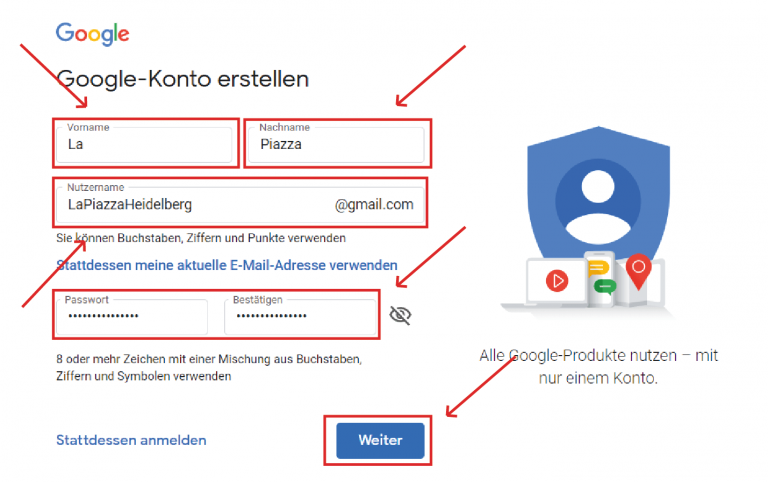
- Input your first and last name. Feel free to use the name of your business,too.
- Create a username. This will be your future email address with the addition “@gmail.com”.
- Choose a secure password.
- Click on continue.
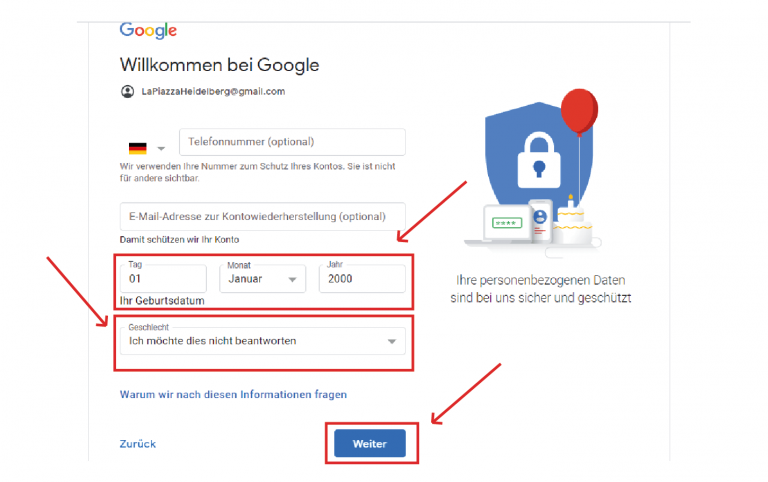
- After that, enter a date of birth and your gender.
- Click next again.
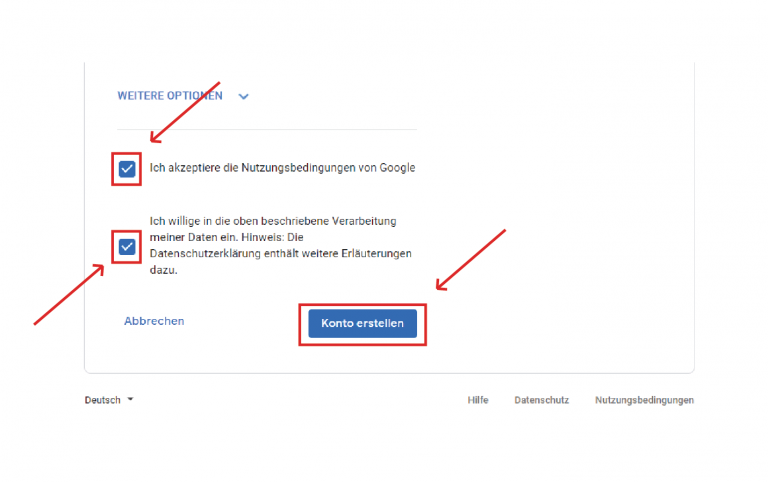
- Accept the terms of use and the privacy policy.
- Finally click on create account.
Congratulations! You have successfully created your first Google Account!
3. Utilizing Your Google Account with the Google Calendar and the CalendarApp:
The CalendarApp is an innovative scheduling tool that relies on the Google Calendar as its backbone. Seamlessly integrated with your Google Account, the CalendarApp harnesses the power of Google Calendar to help you efficiently manage your appointments and bookings accross various industries.
For instance the CalendarApp can be used to find a table, book an accommodation or sign up for a Webinar. The opportunities are almost endless.
By utilizing the CalendarApp, you can easily create, edit, and organize events, send automated appointment reminders, let your customers cancel or reschedule events and so much more.
The integration with your Google account ensures that your appointments are synchronized across all your devices and third party CRM systems like GoHighLevel, providing you with a unified and reliable scheduling experience.
So get started for free and test the CalendarApp for free for 14 days.